

Think of email threading as the feature that turns a messy pile of individual emails into a single, clean conversation. Instead of seeing every reply and forward as a brand new item, your inbox groups them together. It’s a simple concept, but it's the secret to taming a wild support inbox.
Untangling the Chaos of Your Support Inbox
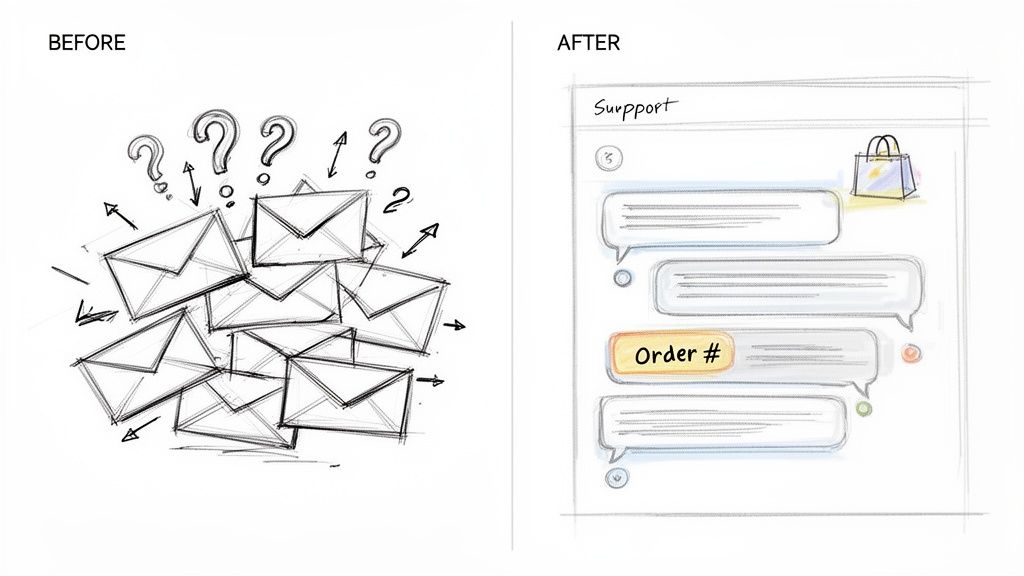
We've all been there. You're trying to help a customer, but the crucial details are lost in a sea of separate emails. The order number is in one message, their shipping address is in another, and the actual complaint is buried in a third. Without threading, your support team has to become detectives, piecing together clues just to understand what's happening.
This isn't just a minor annoyance—it's a huge time sink and a direct threat to customer happiness. A mind-boggling 376 billion emails are sent every single day, and for a busy e-commerce store, that often means hundreds of fragmented conversations. This chaos leads to missed updates, duplicated effort, and unhappy customers. If you want to dive deeper into how complex email chains are managed, these insights from Morris James are a great resource.
The Power of a Unified View
Email threading cuts through the noise. It takes that jumbled mess and organizes it into a clear, chronological story. Suddenly, the entire history of a customer's issue is right there in one place, which is absolutely essential for teams using a shared inbox for Gmail or any other collaborative tool.
Instead of hunting for information, your agents can see everything from the first "hello" to the latest reply at a glance. This immediate context is the difference between a five-minute fix and a five-day-long email chain.
To see just how big of a difference it makes, take a look at this quick comparison.
Email Management Before and After Threading
The table below paints a clear picture of how threading transforms a typical support workflow from a frustrating scavenger hunt into a smooth, efficient process.
| Metric | Without Email Threading (Chaos) | With Email Threading (Clarity) |
|---|---|---|
| Agent Workflow | Manually searching for related emails | Scrolling through a single, chronological view |
| Resolution Time | Slowed by context-gathering and confusion | Faster, as the full history is always visible |
| Risk of Error | High risk of missing key details or duplicating work | Low risk, as the entire conversation is unified |
Simply put, moving to a threaded view gives your team the clarity they need to resolve issues quickly and keep customers coming back.
How Email Threading Works Behind the Scenes
Ever wonder how your inbox magically groups a long back-and-forth conversation into a single, neat little package? It’s not magic, but it’s just as clever. Think of it like a librarian who, instead of just shelving a new book, checks its series title and volume number to place it right next to its prequel.
Email threading does exactly that for your digital conversations. It looks at the hidden data packed into every email to figure out which messages belong together. This is how your support tool can present a clean, chronological conversation, saving your team from hunting down scattered replies.
The Digital Fingerprints That Connect Conversations
So, what’s the secret sauce? It all comes down to special identifiers tucked away in the email’s code, called headers. These headers are like a digital family tree for your messages, creating a clear line of descent from the very first email to the latest reply.
Two of these headers are the real heroes of the story:
- Message-ID: This is a one-of-a-kind code stamped onto every single email ever sent. Seriously. No two emails in the world share the same Message-ID, making it the perfect unique identifier.
- In-Reply-To & References: When you hit "reply," your new email doesn't just go out on its own. It carries the original email’s Message-ID in a special header, either "In-Reply-To" or "References." This is like your email shouting, "Hey, I'm a direct response to that specific message over there!"
By following this breadcrumb trail of IDs, your email client or support platform can piece together the entire conversation, from start to finish.
At its core, email threading technology reconstructs conversations by dissecting headers, smoothing out any inconsistencies from different email servers, and then reassembling the messages with helpful visual cues like indentation to show who replied to whom.
From Simple Filters to Smart Algorithms
This idea has been around for a while. While Microsoft Outlook brought a version of this to the masses back in 2007, the technology used in today’s enterprise tools is on a whole different level, built to handle thousands of support tickets with precision. You can dive deeper into the technical history of email threading on JD Supra.
This sophisticated, automated analysis is what lets your support platform connect a customer's follow-up question to their original order inquiry from three days ago. It’s the invisible engine that provides the complete context your agents need to resolve issues quickly and correctly, without ever having to ask, "Can you remind me what we were talking about?"
How Email Threading Directly Benefits Shopify Stores
Knowing what email threading is on a technical level is one thing. Seeing how it can completely change the game for a busy Shopify store is something else entirely. For any e-commerce brand where customer conversations are everything, threading is more than just a neat organizational feature—it's what turns a messy, reactive inbox into a powerhouse for customer satisfaction.
The magic happens behind the scenes. Every email has a unique digital signature, and when you reply, new emails carry references to the old ones. This is how your inbox pieces the story together.
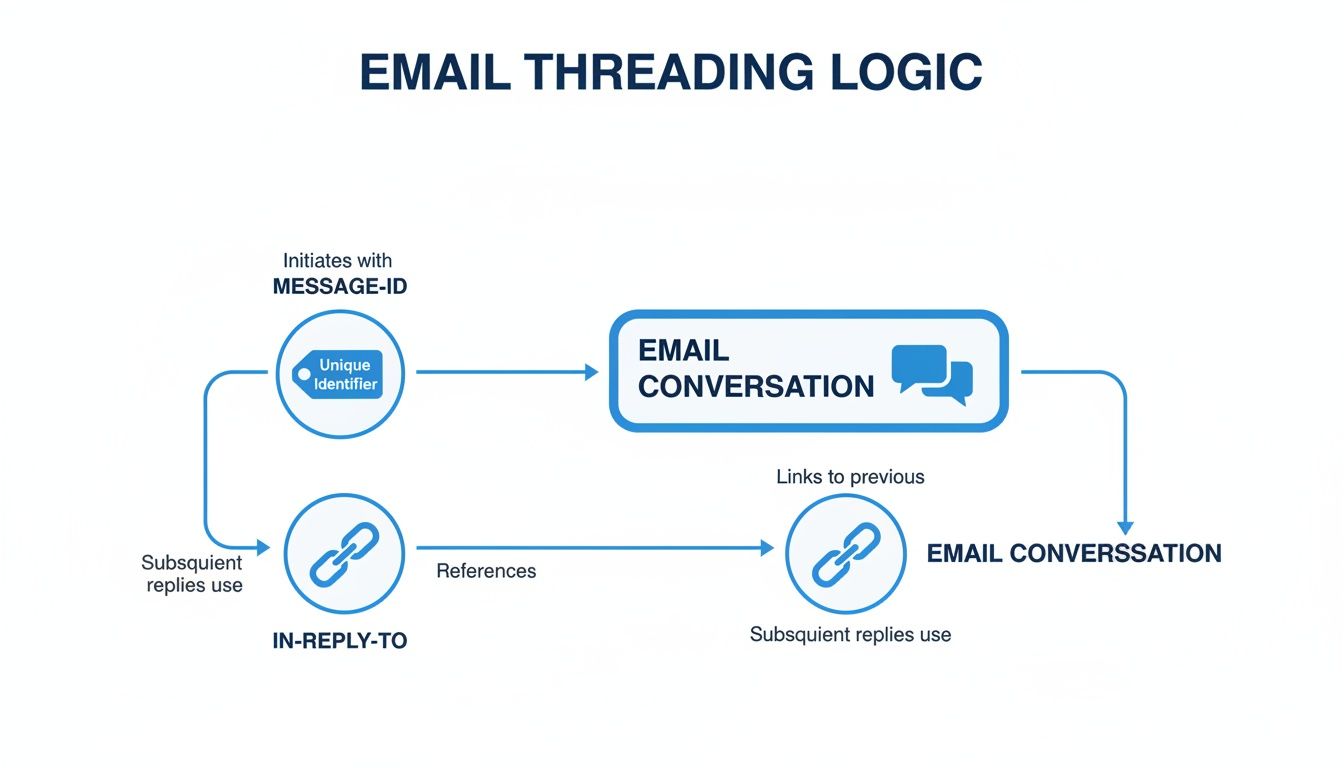
This diagram shows how those "fingerprints" link each message to the last, creating a single, easy-to-follow conversation.
You Get the Full Story, Every Time
By far, the biggest win here is complete context. When a customer emails you about a return, their entire history—the first order confirmation, that question they had about sizing, a follow-up about shipping—is all right there in one continuous stream. Your agents can stop asking customers to repeat themselves and quit hunting for scattered messages.
Think about it. A customer asks, "Where's my order?" With a threaded view, your support agent instantly sees the original purchase, any previous chats about the product, and notes from other team members. The response they give is faster, smarter, and way more personal, which goes a long way in building trust.
Threading creates a single source of truth for every customer conversation. It gets rid of the guesswork and gives your team the confidence to deliver great support, every single time.
Solve Problems Faster
In customer support, time is everything. Email threading gives your team their time back by eliminating the minutes wasted digging for old information. Instead of searching the inbox for a tracking number mentioned three days ago, an agent just has to scroll up.
This isn't a small thing; that time savings adds up fast across a whole team. Quicker replies make for happier customers, and your agents can get through their queue without burning out. Good communication is fundamental to a successful store, and smart Shopify development often involves integrating tools that make the most of threading.
Stop Duplicate Replies and Agent Collisions
Nothing looks more unprofessional than two different agents replying to the same customer with different answers. In a busy shared inbox, this happens all the time. Email threading is the built-in traffic cop that prevents these collisions.
- Clear Ownership: When a conversation is threaded, it’s obvious someone is already on it. Agents can immediately see if a teammate has replied, which stops them from doubling up on work.
- Less Customer Confusion: Customers get one consistent answer, not mixed messages that make your team look disorganized.
- Smooth Handoffs: If a ticket needs to be passed to a manager or another department, the entire history goes with it. The next person can pick it up without missing a beat.
This kind of clarity is what creates a seamless, professional customer experience. You can find more tips on getting your team's workflow in order with the right https://mailo.ai/blogs/customer-support-automation/software-for-email-management in our guide.
Common Issues That Break Email Threads
While email threading is a lifesaver for organizing your inbox, it isn't perfect. Think of a thread as a chain—each reply is a link held together by specific, invisible data. If one of those links gets changed or goes missing, the chain snaps. The result? New messages get orphaned, completely isolated from the conversation they belong to.
Understanding what causes these breaks is the key to preventing them. Most of the time, the culprits are simple actions by a customer or even an agent that accidentally mess with the metadata email clients need to keep things grouped. This can instantly undo all the benefits of threading, sending your team on a frustrating scavenger hunt for context.
When Subject Lines Change
One of the most common ways a thread breaks is when someone changes the subject line. Modern email systems mostly rely on hidden headers like the Message-ID, but many still use the subject line as a backup clue. Change it too much, and the system gets confused and starts a brand-new conversation.
Imagine a customer emails you with the subject "Order #1234 Status." After a few back-and-forths, they get impatient and send a new message with the subject "URGENT HELP with my order!!" To them, it's the same conversation. But to the email client, that new subject looks like a totally different topic, creating a separate thread and burying the original context.
A broken thread forces your team to become detectives, piecing together a conversation that should have been unified. This wastes time and increases the risk of providing incomplete or inaccurate support.
The Problem with Forwarding Emails
Forwarding emails is another notorious thread-breaker. When you reply to a message, the system preserves the chain by including the original Message-ID in the new email's headers. This keeps the conversation linked.
But when you forward an email, you're essentially creating a brand-new message with its own unique Message-ID. It completely severs the connection to the original conversation, starting from square one. This happens all the time when an agent tries to loop in a manager or another department. Instead of forwarding, the best practice is to "Reply" and simply add the new people to the CC field to keep the thread intact.
To get a better handle on how these digital identifiers work, check out our guide on email header examples.
Outdated Email Clients
Sometimes, the technology itself is to blame. Most modern email platforms are fantastic at keeping threads together, but some older or less-common email clients don't always include the necessary "In-Reply-To" or "References" headers.
When a customer uses one of these outdated clients, their reply might land in your inbox as a completely new, standalone email—even if they did everything right and hit the reply button.
Best Practices for Managing Threaded Conversations
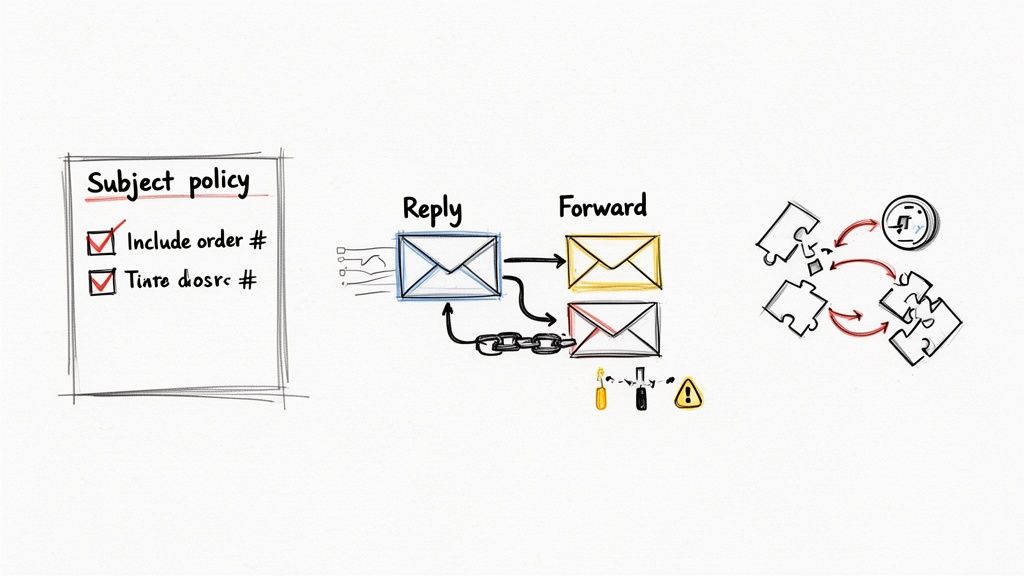
Getting email threading right isn’t just a technical challenge—it’s about building smart habits across your support team. When you establish clear, simple guidelines, you can sidestep most of the common issues that break threads. This keeps your conversations clean and ensures your agents always have the full story.
Think of these practices as turning your support inbox from a potential source of chaos into a well-oiled machine. The idea is to make thread integrity a natural part of your workflow, not something you have to fix later.
Establish Clear Team Guidelines
Consistency is everything. When your whole team plays by the same rules, you drastically reduce the odds of a customer conversation getting splintered into confusing, separate tickets. A few simple policies can make a world of difference.
Here’s where to start:
- Standardize Subject Lines: Create a strict policy for how subjects are formatted. Always include a unique identifier like an order number or ticket ID. For example, "Re: Your Question on Order #SH12345". This gives your system a reliable anchor for the entire conversation.
- Train on 'Reply' vs. 'Forward': This one is critical. Make sure every agent knows to always use "Reply" when continuing a conversation. Even if they need to add someone to the CC line, "Reply" is the way to go. Reserve "Forward" exclusively for starting a completely new discussion with a different team or contact.
- Handle Topic Changes Properly: If a customer replies to an email about their order but asks a totally unrelated question about returns, it’s time for a new thread. Teach agents to start a fresh email chain with a new subject line. This keeps each conversation focused and prevents one massive, confusing thread from getting out of control.
Leverage Automation as Your Safety Net
Let’s be realistic—even with the best training, people make mistakes. Customers will wipe out subject lines, and a new agent might forward an email instead of replying. This is exactly where modern support tools come in, acting as an essential safety net to protect your threaded conversations.
Intelligent support platforms don't just rely on basic email threading—they actively work to protect and enhance it. They can find and stitch together related messages even when the technical breadcrumbs are broken, so no context ever falls through the cracks.
Tools like MAILO AI are built to understand the real-world messiness of e-commerce support. The platform’s AI can figure out that an email with the subject "URGENT HELP" is probably related to "Order #SH12345" by looking at the sender, the body content, and other metadata. It then automatically links the messages behind the scenes.
This intelligent linking is a game-changer. It means your agents aren't wasting precious minutes hunting for orphaned messages or trying to piece together a customer's history. The system does that heavy lifting for them, making sure the full context is always right there, in one place.
How to Measure the Impact of Email Threading
So, you've implemented email threading. That’s a fantastic first step, but how can you be sure it's actually making a difference? To really understand the value of a well-organized inbox, you need to move past gut feelings and dig into the data. Tracking the right metrics is the only way to prove how much threading improves your team's efficiency and your customers' happiness.
The whole point is to connect the dots between having full context and saving time. When your agents aren't wasting minutes—or hours—hunting for old messages, their performance naturally gets better. The proof is in the numbers.
Key Metrics to Track
To get started, focus on a few core metrics that are directly impacted by how you manage conversations. These numbers will tell a powerful story about what happens when your support operations are built on clean, threaded conversations.
- Average Resolution Time: This is the big one. It measures the total time from the moment a customer first reaches out until their issue is fully resolved. With proper threading, agents get the full picture instantly, which should cause a significant decrease in this metric.
- Replies per Ticket: A lower number here is a clear win. Threading gives agents all the information they need upfront, meaning they can solve problems with fewer back-and-forth messages. It’s a direct indicator of efficiency.
Ultimately, you want to draw a straight line from organized communication to real business outcomes. By tracking these KPIs, you can build a report that shows exactly how many hours your team is saving and how much faster you're closing tickets.
Using Analytics to Prove ROI
This is where a platform with solid built-in analytics becomes indispensable. A system like MAILO AI automatically keeps tabs on these performance indicators, turning raw support data into a dashboard that visualizes your team’s efficiency gains.
This lets you easily calculate the return on investment (ROI) of your organized support system. You can walk into a meeting and show stakeholders, with clear data, that adopting better email threading isn't just about being tidy—it's about making the team faster, more effective, and delivering a customer experience that sets you apart.
Got Questions About Email Threading? We’ve Got Answers.
As you start using threaded conversations more, a few questions always seem to come up. Think of this as the quick-start guide to clearing up the common sticking points and making sure your team gets it right from day one.
Let’s dive into some of the most common questions people have about how this all works in the real world.
Does Changing the Subject Line Always Break a Thread?
Not always, but you’re definitely playing with fire. Modern email clients are smart; they mostly rely on hidden technical data like the Message-ID and In-Reply-To headers to connect the dots. That's the primary glue holding a conversation together.
However, the subject line is often the backup plan. Simple changes like adding "Re:" or "Fwd:" are usually harmless. But if a customer changes "Order #1234 Status" to something completely different like "URGENT HELP," you’re running a huge risk. The system might get confused and spin that message off into a brand new, lonely thread.
How Does AI Make Email Threading Better?
Standard email threading is fantastic when it works, but it's brittle. A single misstep can snap the conversation in two. This is where AI comes in to provide a much-needed safety net. Instead of just looking at those technical headers, AI actually reads the content, looks at who is involved, and uses context to figure out what belongs where.
It’s like having a super-smart assistant tidying up your inbox. Even if a customer botches the subject line or forwards an email in a weird way, an intelligent system can spot the connection and merge that stray email back into its rightful home.
Can You Manually Merge Two Conversations?
If you’re using a standard inbox like Gmail or Outlook, the answer is no. Once a thread is broken, it stays broken. You’re stuck with two separate conversation streams.
This is a major reason why teams upgrade to specialized support platforms. Many help desk tools have a "merge conversations" feature built right in. This is a lifesaver for fixing those inevitable threading errors and making sure your agents have the full customer story, all in one place, without having to jump between different threads.
Ready to stop broken threads from derailing your support team? MAILO AI uses intelligent automation to keep every customer conversation perfectly organized, even when things get messy. Discover how you can save time and deliver better support by starting your free trial today.