

If you're constantly buried under a mountain of "Where is my order?" (WISMO) emails and wrestling with a messy returns process, you’re not alone. This is the exact breaking point where many growing DTC brands find their manual, homespun support system starts to crack under the pressure. The good news is that ecommerce customer service software is designed to turn this chaos into a smooth, loyalty-driving machine.
Why Your Growing Ecommerce Brand Needs a Support Upgrade
As your store scales, that initial charm of personally handling every customer email disappears fast. What once felt like a personal touch quickly becomes a major bottleneck. Your inbox explodes with the same questions over and over, return requests get buried in long email threads, and your team burns precious time digging for order details instead of actually helping people.
This isn't just inefficient—it’s a real threat to your reputation and, ultimately, your revenue. When support is slow, inconsistent, or just plain unhelpful, you don’t just lose one sale. You risk losing that customer forever.

From Manual Chaos to a Central Nervous System
Think of your early support efforts like a small-town shopkeeper trying to remember every regular's order. It works for a while, but it's impossible to maintain that personal touch as the town grows. You start forgetting names, mixing up orders, and the experience suffers.
Ecommerce customer service software is like the central nervous system for your entire customer experience. It connects every conversation, remembers every detail, and gives your team the tools to provide fantastic service, no matter how big you get.
Instead of juggling scattered email inboxes and clunky spreadsheets, you get one unified command center. This is the fundamental shift that helps your support team evolve from a reactive cost center into a proactive engine for growth.
The True Cost of Inefficient Support
Sticking with manual support has hidden costs that are much bigger than just wasted time. It creates a disjointed, frustrating experience for your customers. When they have to repeat their story every time they reach out or wait two days for a simple tracking number, their trust in your brand starts to fade.
This is where a dedicated ecommerce customer service platform really shines. It's built to solve the specific pain points that scaling brands face:
- Inconsistent Replies: Stop the guesswork. With templates and a shared inbox, every customer gets a consistent, on-brand answer, no matter who on your team replies.
- Wasted Agent Time: You can automate responses to all those repetitive questions, freeing up your team to focus on the complex issues where a human touch really matters.
- Lack of Context: No more tab-switching. Agents get a complete view of a customer's order history and past conversations right inside the ticket.
- Missed Opportunities: Every support interaction is a chance to build a relationship. The right software helps you spot opportunities to upsell, gather valuable feedback, or just make a customer's day.
This guide will walk you through everything you need to know, from the basic concepts to implementing a system that saves time, builds rock-solid loyalty, and drives repeat business for your brand.
What Exactly Is Ecommerce Customer Service Software?
Let's break down what this software really does. Think of ecommerce customer service software as the central nervous system for all your customer conversations. It’s a dedicated hub built from the ground up to handle the specific chaos that comes with running an online store.
If you’ve ever tried to manage support by jumping between your Gmail inbox, Instagram DMs, a live chat widget, and your website’s contact form, you know the feeling. It’s like running a busy cafe by scribbling orders on sticky notes and shouting them at the kitchen—things get missed, customers get frustrated, and it's impossible to scale.
This is where specialized software steps in. It pulls every single one of those conversations from every channel into one clean, organized dashboard. That scattered mess of messages becomes a clear, manageable workflow for your team.
The Power of a Unified Customer View
But here's where it gets really good. This software doesn't just collect messages; it connects directly to your ecommerce platform, like Shopify.
So when a customer emails asking, "Where's my package?", you don't just see their question. The software automatically pulls up their entire order history, shipping status, and any past conversations right next to their message. No more frantic tab-switching or logging into Shopify to hunt for an order number while the customer waits.
This is what we call a unified customer view, and it’s a total game-changer. Everything your support agent needs to solve the problem is right there, in one place.
This immediate access to information helps your team shift from just reacting to problems to proactively creating better experiences. For instance, they can:
- Spot VIPs instantly: See a customer's lifetime spending and order count, allowing you to give your most loyal fans the white-glove treatment they deserve.
- Anticipate what's next: Notice a customer has asked about a certain product before? Your agent can offer personalized advice in their next chat.
- Solve issues on the first try: Having the full context means agents can fix even complex problems in one go, which is a huge boost for customer satisfaction.
The explosive growth of this technology shows just how critical it's become. The global customer service software market was valued at $7.775 billion in 2021 and is on track to hit $67.277 billion by 2033, growing at a steady 19.7% CAGR. This isn't just a niche tool anymore; it's a must-have for any brand that wants to compete. You can discover more insights about the expanding software market and its trends.
More Than Just Answering Tickets
At the end of the day, using purpose-built software is about changing the entire mission of your support team. The goal is no longer just to clear the inbox and "close tickets."
The objective isn't just to answer questions faster. It’s to build a scalable, brand-aligned support experience that makes every customer feel seen, heard, and valued—turning one-time buyers into lifelong advocates.
When your team has the right tools and the right context, they’re not just providing information. They’re building relationships, uncovering valuable feedback, and creating the kind of memorable moments that drive word-of-mouth growth. This is how you build a brand people don't just shop with, but truly feel connected to.
Core Features That Power Modern Ecommerce Support
Modern ecommerce customer service software is so much more than a glorified inbox. It’s the engine of your support operations, with several powerful parts working in harmony. These are the core features that stop you from just reacting to problems and start letting you build a proactive system that actually creates brand loyalty and boosts revenue.
Think of it like swapping out a basic hand tool set for a full professional mechanic's garage. You're not just getting a better wrench; you're getting a complete diagnostic and repair system built specifically for the vehicle that is your ecommerce store.
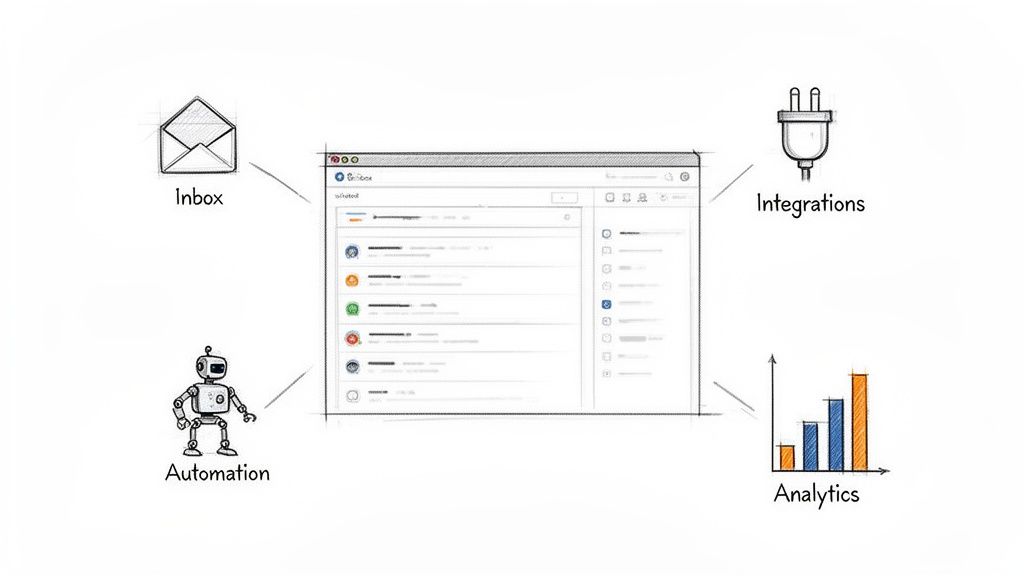
Let's break down the four pillars that make this entire system tick.
1. Unified Inbox and Ticketing
First things first, this software pulls every single customer message into one central command center. An email, a Facebook comment, a live chat, an Instagram DM—they all land in the same queue. This unified inbox instantly kills the chaos of juggling a dozen different tabs and accounts.
From there, each conversation is turned into a ticket. This is a simple but game-changing shift. A ticket is a trackable, assignable unit of work, meaning that instead of emails getting lost in the shuffle or two agents accidentally replying to the same person, every customer issue has a clear owner and a live status.
Imagine a negative comment on a Facebook ad about a shipping delay. Instead of just sitting there for everyone to see, the software can automatically convert it into a high-priority ticket and ping your support lead. That's how you get a fast, brand-saving response.
2. AI-Powered Automation and Workflows
This is where the real magic happens. Automation takes all the repetitive, soul-crushing tasks off your team's plate. The most common example? Instantly answering all those "Where is my order?" (WISMO) questions.
The AI connects directly to your store's data, grabs the real-time tracking info, and shoots back a personalized reply without a human ever touching it. For many brands, this one feature can deflect 30-40% of all incoming support requests.
But it gets much smarter than that:
- Intelligent Routing: The system can scan incoming messages for keywords like "damaged" or "return" and automatically assign them to the right person or department.
- Automated Tagging: Tickets get tagged based on their content (e.g., "feedback," "pre-sale question," "shipping issue"), making it ridiculously easy to spot trends.
- Drafted Replies: For more complex issues, the AI can write up a complete, context-aware reply based on the customer's order history. Your agent just has to review and hit "send."
By automating the routine stuff, you free up your skilled human agents to focus on high-value conversations—like helping a customer pick the perfect product or turning a major complaint into a five-star review.
3. Deep Ecommerce Integrations
A generic helpdesk simply can't hang with software built specifically for ecommerce. The secret sauce is the deep integration with platforms like Shopify. This connection pipes a ton of rich customer data right into the support view.
So, when an agent opens a ticket, they immediately see everything they need:
- Complete Order History: Every single purchase that customer has ever made.
- Lifetime Value (LTV): How much the customer has spent with your brand over time.
- Shipping Status: Real-time tracking info for their current order.
- Customer Details: Their shipping address and contact info.
This context is priceless. Your agent instantly knows if they’re talking to a first-time buyer or a loyal VIP. They can process a return, issue a refund, or apply a store credit directly from the helpdesk—no more flipping between different apps.
4. Analytics and Performance Reporting
You can't fix what you can't see. True ecommerce customer service software gives you a dashboard with the key performance indicators (KPIs) that tell you exactly how your support operation is doing. We're talking way beyond just counting tickets here.
This lets you track the metrics that actually matter:
- First Response Time: How quickly are you getting back to new inquiries?
- Resolution Time: What's the average time it takes to fully solve a customer's issue?
- Customer Satisfaction (CSAT) Score: Direct feedback from customers on how you did.
- Agent Performance: Metrics for individuals and the team, so you can spot top performers and find coaching opportunities.
These insights are your roadmap for improvement. If you see resolution times for "return" tickets are spiking, maybe there's an issue with your returns policy or a confusing product description. You can find the root cause and fix it for good.
Manual Support vs. Automated Ecommerce Software
The difference between wrestling with a standard email inbox and using a dedicated ecommerce platform is night and day. One is a constant game of catch-up, while the other is a system designed for efficiency and growth.
This table breaks down how everyday tasks change.
| Task | Manual Process (e.g., Gmail) | With Ecommerce Customer Service Software |
|---|---|---|
| Answering "Where's my order?" | Agent manually looks up order in Shopify, copies tracking, pastes into an email. | AI bot automatically pulls tracking data and sends an instant, personalized reply. |
| Handling a Return Request | Agent finds the order, navigates to the returns app, generates a label, emails it. | Agent clicks "Start Return" inside the helpdesk; system auto-generates label and instructions. |
| Identifying a VIP Customer | Agent has to guess or manually search the customer's name in Shopify. | A "VIP" tag and the customer's total spending are displayed right next to their message. |
| Tracking Team Performance | Manually counting emails or using clunky spreadsheets. Very inaccurate. | A real-time dashboard shows response times, resolution times, and CSAT scores per agent. |
| Managing Multiple Channels | Constantly switching between email, Instagram DMs, and Facebook comments. | All messages from all channels appear in one unified, organized inbox as tickets. |
Ultimately, a manual setup forces your team to spend their time on tedious administrative work. An automated system empowers them to spend their time actually helping customers, which is what really drives the business forward.
How to Choose the Right Software for Your Shopify Store
Picking the right customer service software for your ecommerce store is a lot like choosing a long-term business partner. It's not about being wowed by a flashy feature list. It’s about finding a platform that truly gets your brand, your team, and where you're headed. If you jump at the first option that promises to solve all your problems, you'll likely end up with more headaches than you started with.
What you really need is a practical way to cut through the marketing hype and find a solution that will actually make your life easier. This comes down to asking the right questions and focusing on the things that matter most for a growing Shopify store.
Depth of Shopify Integration
This is, without a doubt, the most important factor. The way a helpdesk connects to your Shopify backend can make or break your team’s efficiency. A shallow integration might pull in a basic order number, but that's it. Your agents will still be stuck flipping between tabs just to find the info they need.
A deep, native integration is a whole different ballgame.
Look for a platform that treats Shopify as its first language. It should be able to:
- Show complete order histories right inside the support ticket. We’re talking every item purchased, shipping status, and tracking numbers at a glance.
- Let agents take action without leaving the helpdesk. They should be able to process refunds, cancel orders, or create a discount code on the spot.
- Sync rich customer data, like lifetime value (LTV) and customer tags. This gives your team instant context to spot VIPs and personalize their support.
When you’re in a demo, get specific. Ask them, "Can my agent issue a 15% discount code and see the customer's entire purchase history on the exact same screen?" Their answer will tell you everything you need to know.
Scalability for Future Growth
The software that works perfectly when you’re doing 100 orders a month might completely fall apart at 1,000. Scalability isn't just about handling more tickets; it’s about whether the platform can grow with you. This means looking at its automation power, its pricing model, and how it performs under pressure.
A huge part of scaling effectively is self-service. The market for customer self-service software is expected to hit a staggering USD 65.66 billion by 2031, with ecommerce leading the charge. This massive trend is a clear signal: customers want instant answers and the ability to track their own orders. You have to meet that expectation.
Think about where you'll be in a year or two. Does the platform offer advanced AI features you can turn on later? Does its pricing punish you for growing, or does it have clear, predictable tiers that make sense for your business?
Ease of Use for Your Team
The most powerful software on the planet is useless if your team hates using it. A clunky, slow interface leads directly to slow response times, frustrated agents, and ultimately, a poor customer experience. The platform should feel like a natural extension of your team’s workflow, not another obstacle to overcome.
The goal is to find a tool that reduces cognitive load, not adds to it. Your team should spend their mental energy solving customer problems, not fighting with the software.
When you’re evaluating a tool, think about these points:
- The Onboarding: How fast can a new hire get up and running?
- The Interface: Is it clean, quick, and intuitive?
- Workflow Customization: Can you easily build the specific rules and automations your team actually needs?
Better yet, ask for a trial and have one of your real agents use it for a day. Their honest feedback is worth more than any sales pitch.
Sophistication of AI Capabilities
Finally, you need to dig into the platform’s AI. Let's be clear: not all "AI" is the same. Some tools just use simple keyword-based rules, while others have advanced models that can truly understand context, customer sentiment, and intent. You can learn more about how AI customer support software works in our detailed guide.
Don't be afraid to ask the demo team some pointed questions:
- "Can I set up a workflow that automatically tags any ticket mentioning 'damaged' and assigns it to our returns specialist?"
- "Can the AI draft a reply for a return request that pulls in the customer's specific order items and a link to our return policy?"
- "How does the AI learn to match our brand's unique tone of voice?"
The answers will quickly reveal if you're looking at a basic automation tool or a genuine AI partner that can handle complex and nuanced customer conversations.
Measuring the True ROI of Your Support Software
So, you’ve invested in new customer service software. That’s a great first step, but how do you actually prove it was worth the money? To justify the cost, you need to move past vague feelings about "better support" and get down to the hard numbers. Measuring return on investment (ROI) isn't just about what you save; it's about connecting your support efforts to real business growth.
Think of this software as a growth driver, not just another line item on your expense sheet. The right platform can transform your support team from a reactive cost center into a proactive engine for efficiency, loyalty, and even sales. It's a strategic move, and it's where the market is heading.
The retail ecommerce software market is expected to balloon to USD 26.95 billion by 2032, growing at a staggering 32.4% CAGR. Why the massive growth? Because brands are finally adopting smarter, AI-powered tools to keep up with what modern customers expect. Read the full research about the expanding ecommerce software market.
Agent Efficiency and Cost Reduction
The most straightforward way to see ROI is by calculating how much time and money your new software saves. Before you do anything else, establish a baseline. Figure out your cost per ticket by dividing your total monthly support costs (salaries, tools, etc.) by the number of tickets you handle.
Once the new system is up and running, track this number again. When automation starts handling all the common, repetitive questions, your agents are freed up to focus on complex issues. You’ll almost certainly see that cost per ticket drop significantly.
- Time Saved: Put a number on the hours you're getting back. If AI deflects 500 "Where is my order?" tickets a month, and each one used to take an agent three minutes to solve, that’s 25 hours saved every single month.
- Headcount Scaling: Good software lets your current team handle a much higher volume of inquiries without feeling overwhelmed. This means you can delay hiring more support staff, even as your brand grows.
Boosting Customer Lifetime Value
Great service doesn't just solve problems; it turns one-time buyers into loyal, repeat customers. Fast, helpful support is a huge driver of loyalty, which directly impacts your Customer Lifetime Value (LTV)—one of the most critical metrics for any ecommerce brand.
Superior customer service doesn't just solve a problem; it creates a positive emotional connection to your brand. This connection is the foundation of loyalty and the key to unlocking higher LTV.
Start tracking the LTV of customers who interact with your support team after the new software is in place. Compare it to your historical data. You’ll likely find that customers who get quick, effective, AI-assisted help are far more likely to come back for a second or third purchase.
Improving Conversion Rates and Brand Reputation
Customer support isn’t just a post-purchase activity. Quick answers to pre-sale questions can be the final nudge a hesitant shopper needs to click "buy." By providing instant responses through live chat or automated email replies, your software can directly contribute to your conversion rate.
At the same time, keep an eye on your brand's overall health with a few key metrics:
- Customer Satisfaction (CSAT) Scores: After a support chat ends, send a quick survey asking customers to rate their experience. A rising CSAT score is a clear win.
- Net Promoter Score (NPS): This classic metric measures overall brand loyalty by asking one simple question: "How likely are you to recommend us?"
- Online Reviews: Monitor reviews on sites like Trustpilot. A noticeable drop in negative comments about slow or unhelpful support is a powerful, real-world indicator of your software's impact.
While our focus here is on support software, the principles of measuring effectiveness apply broadly. For a different perspective on ROI, some find it useful to explore concepts from advertising effectiveness measurement. Each of these data points helps you build a rock-solid business case, proving your software is a revenue-generating asset, not just a cost.
For a deeper dive into the numbers that matter, check out our guide on how to measure customer service.
Setting Up Your First Automated Workflows
Alright, let's move from theory to action. This is where you’ll really see the magic happen with your new customer service software. Getting your first automations up and running is way less intimidating than it sounds, and by focusing on a couple of high-impact workflows, you can start clearing your team's plate from day one.
The initial setup is surprisingly quick. You'll start by connecting your Shopify store, which lets the software pull in all that crucial customer and order data. Then, you'll teach the AI to sound like you. You do this by feeding it past customer conversations, help center articles, and even just the copy from your website.
This step is key—it ensures every automated reply feels authentic to your brand, not like it came from a generic chatbot. Once that's done, you're ready to build.
Workflow 1: A Fully Automated WISMO Reply
Every single ecommerce store gets flooded with one question above all others: "Where is my order?" (WISMO). This is the absolute perfect candidate for your first full automation. It’s high-volume, requires zero complex thought, and can be solved instantly with the right data.
Here’s the simple breakdown of how you set it up:
- Create a Trigger: You'll tell the system to watch for incoming emails with phrases like "where is my order," "tracking status," or "shipping update."
- Define the Action: Because the software is connected to Shopify, it instantly looks up the customer's order and grabs the real-time tracking number and status.
- Craft the Response: The AI then writes a personalized reply in your brand’s voice, complete with a direct link to the carrier’s tracking page, and sends it off. No human ever has to touch it.
Seriously, this one workflow alone often deflects up to 40% of all support tickets. That frees up a massive amount of your team's time to focus on customers who actually need their help.
Workflow 2: A Hybrid Damaged Item Report
Now, not every problem can—or should—be handed over to a robot entirely. When a customer receives a damaged item, they need empathy and a thoughtful solution. This is where a hybrid, or semi-automated, workflow really shines by blending AI efficiency with a human's final say-so.
The goal isn't to replace your support agent. It's to give them superpowers so they can solve the problem in a fraction of the time.
Think of a hybrid workflow as a super-efficient assistant. It gathers all the info, drafts the perfect response, and suggests a solution. All your agent has to do is give the final nod with a single click.
Here’s how that plays out:
- Trigger: The system spots an email containing keywords like "damaged," "broken," or "arrived defective."
- AI Action: The AI immediately tags the ticket as a "Damaged Item" and assigns it to the right person. It then drafts a reply that apologizes, confirms which product was damaged (by pulling order data), and proposes a solution like, "We can send a free replacement right away."
- Human Approval: Your agent sees the drafted reply queued up. They can review it and, if it looks good, just hit "Send." They still have full control to edit the draft or offer a different fix, like store credit.
This is how those efficiency gains start to directly impact your bottom line.
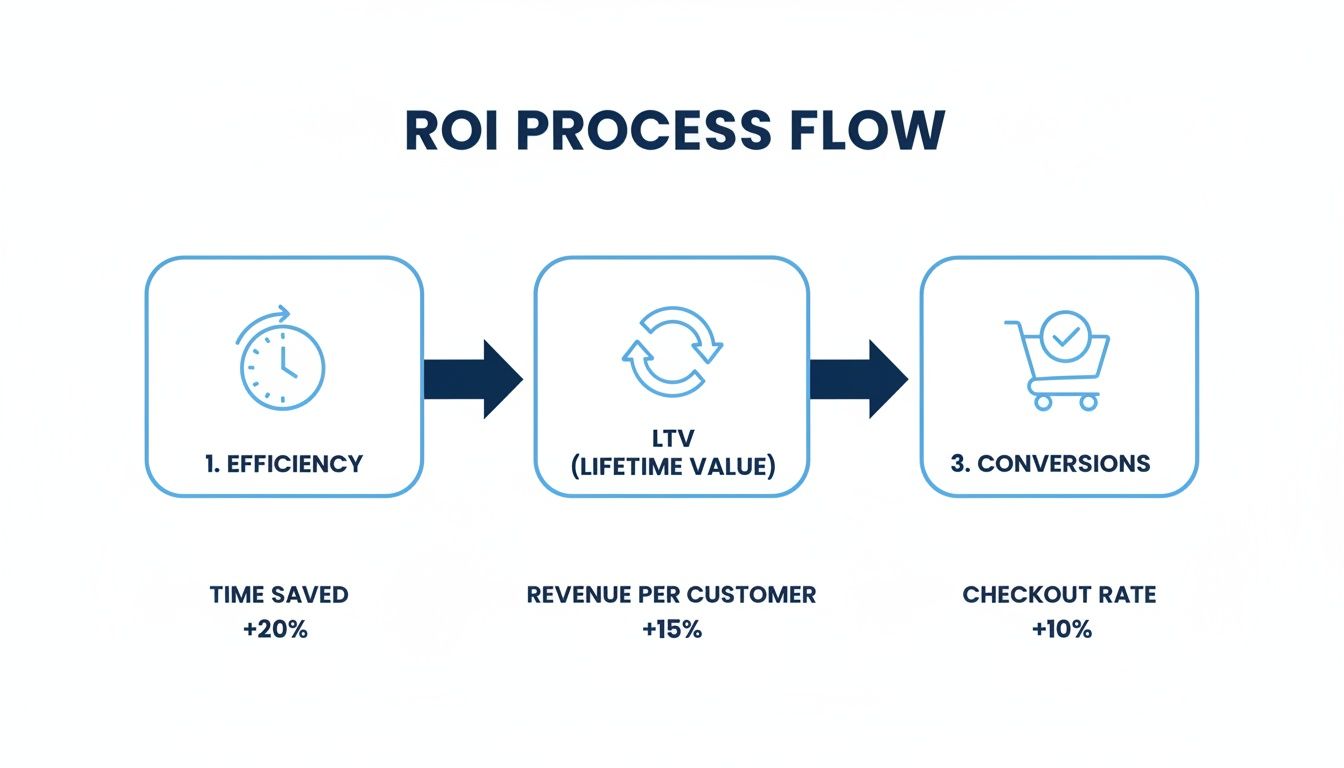
When you make your support faster and more effective, you create happier customers who stick around longer and buy more.
Tackling these two workflows first is a powerful one-two punch. You'll immediately wipe out your most repetitive ticket and simultaneously make it easier for your team to handle sensitive issues with grace. For more inspiration on where to go next, check out our guide on how to automate customer service.
Frequently Asked Questions
Jumping into a new piece of software always brings up questions. Let's tackle some of the most common ones we hear from brand owners who are thinking about leveling up their customer support game.
How Long Does It Really Take to Set Up This Software?
This is a big one. Nobody has time for a weeks-long, complicated setup. The great news is that modern platforms are built to get you up and running fast. For most Shopify stores, you can expect to be live in just a few hours.
The initial setup is usually pretty straightforward:
- Connect your Shopify store (often with just one click).
- Pull in your past customer conversations so the system has context.
- Set up one or two simple, high-impact automations, like an instant reply for "Where's my order?" questions.
The goal isn't to boil the ocean on day one. It's about getting in, seeing some immediate wins, and then layering in more advanced workflows as your team gets the hang of it. You should be handling tickets more efficiently by the end of the day, not the end of the month.
Can an AI Truly Sound Like My Unique Brand?
Absolutely, and this is where things have gotten really exciting. Modern AI has moved way beyond the stiff, robotic scripts of the past. Instead, it learns directly from your brand's voice to act as a genuine extension of your team.
The AI is trained on your specific data—your past support emails, your help center articles, even the copy on your website. It soaks up your tone, your common phrases, and your overall personality, whether you're witty and casual or more formal and empathetic.
What this means is that every automated response feels authentic. It sounds like it came from you, creating a consistent experience for your customers. You end up with an assistant that feels less like a chatbot and more like your most seasoned support agent.
Is This Software Affordable for a Small Business?
It's easy to think this kind of powerful automation is only for the big players with deep pockets, but that's a common misconception. The best ecommerce customer service software today is built with growing businesses in mind, offering flexible pricing that scales with you. You're not locked into a massive enterprise contract; you pay for what you actually use.
It helps to think of it less as a cost and more as an investment in pure efficiency. When you can automate a huge chunk of your repetitive support tickets, the software often pays for itself. Your team can suddenly manage a much higher volume of customers without you needing to hire more people, which is a direct win for your bottom line.
Ready to see how AI can transform your support experience? MAILO AI integrates seamlessly with Shopify to automate responses, delight customers, and free up your team to focus on growth. Start your free trial today.