

Let's get straight to it: AI customer support software is all about using smart technology to handle customer questions and issues more effectively. Think of it as a super-powered assistant for your support team, one that can instantly answer common questions and organize everything behind the scenes.
This frees up your human agents to tackle the trickier, more nuanced problems that really require a human touch. The result? Faster, smarter service for your customers and a less overwhelmed team.
The New Standard for Customer Experience
We all know the deal. Today’s customers expect answers now, not tomorrow. They want support that feels personal and actually solves their problem on the first try, whether it's midnight or the middle of a busy workday. Old-school support models just can't keep up. They often lead to long wait times, frustrated customers, and burned-out agents.
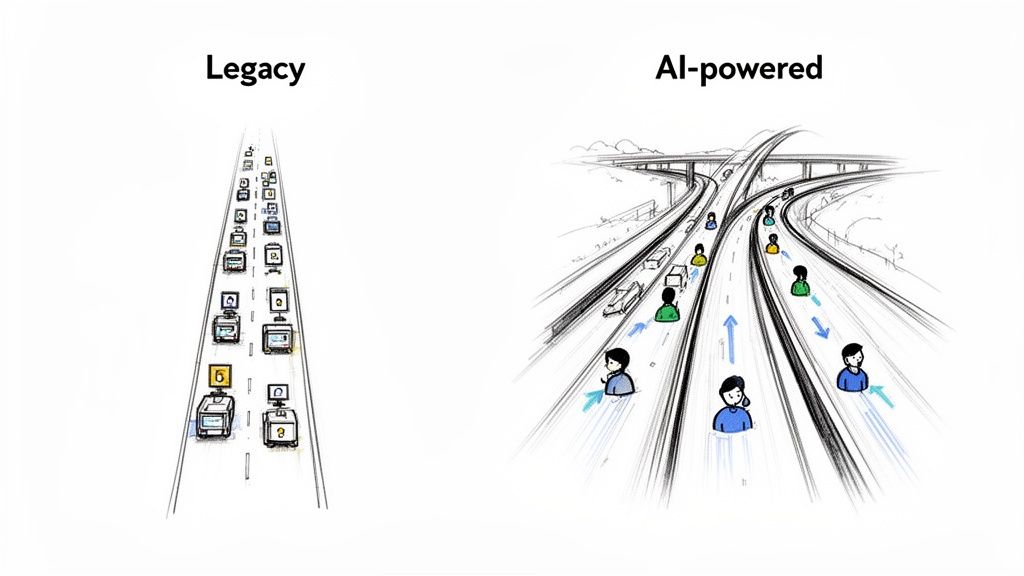
Imagine a traditional support queue as a single-file line at the DMV. Every single ticket—from a simple password reset to a complex product defect—gets stuck in the same slow-moving line. It's an outdated approach that just doesn't work for the speed of modern e-commerce.
Shifting from Reactive to Proactive Support
AI customer support software completely changes the game. It takes that single-file line and turns it into a smart, multi-lane highway. Simple, repetitive questions are instantly routed to automated fast lanes for an immediate answer. Meanwhile, complex issues are sent directly to the right human expert who can provide the detailed help needed.
This isn't just a small operational tweak; it's a fundamental shift in strategy. It allows your support team to move from being a reactive cost center that just puts out fires to becoming a proactive engine for growth. When your team isn't buried in basic tickets, they can focus on creating genuinely positive experiences that build loyalty and keep customers coming back.
The market for ai customer support software is booming for a reason. Businesses everywhere are seeing the incredible impact of smart chatbots, virtual assistants, and generative AI. For a deeper dive, you can explore more data on the latest AI customer service stats and trends.
What This Guide Will Cover
This guide is your roadmap. We're going to break down exactly how this technology works, walk through the must-have features, and give you a practical checklist for choosing and implementing the right tool for your business. By the time you're done, you'll have a clear picture of how AI can help you create the kind of standout customer experience that sets your brand apart.
How AI Customer Support Software Really Works
So, how does this AI software actually do its job? Getting into the weeds of the technology can feel a bit like a computer science lecture, full of complex terms. A better way to grasp it is to stop thinking of it as a single piece of software and start picturing it as a highly efficient digital crew working right alongside your human team.
This isn't just one robot doing everything. Instead, think of it as a team of specialists, each with a very specific role. They're built to make your whole support operation smarter and faster. Plus, they never need a coffee break, work 24/7, and happily take on the repetitive, draining tasks that often burn out your best agents.
Let's meet the key players on this AI-powered team.
The Triage Specialist
First, you have the Triage Specialist. Think of a busy ER, where a triage nurse quickly assesses every patient to see who needs urgent care. This AI does the exact same thing for your customer support inbox. It reads every new ticket the second it arrives, whether it's an email, a chat message, or a form submission.
Using something called Natural Language Processing (NLP)—which is just a fancy way of saying it can understand human language—the AI figures out what the customer actually wants. Is this a simple question about a return? A frustrated complaint about a broken item? A pre-sale question about sizing?
Once it understands the intent, it gets to work immediately:
- Routing: It automatically sends the ticket to the right person or department. Billing questions go to the finance team, and complex technical issues go to your senior support agents.
- Prioritizing: It flags high-priority tickets, like a message from an unhappy VIP customer, and bumps them to the top of the queue.
- Tagging: It adds labels like "shipping_delay" or "payment_issue" to every ticket. This keeps your inbox organized and makes reporting so much easier down the line.
This whole process happens in a blink. It means no more tickets falling through the cracks and ensures the most qualified person handles every query from the get-go, slashing those initial response times.
The FAQ Expert
Next up is the FAQ Expert. Most of us know this player as the chatbot or AI agent. Imagine having a team member who has perfectly memorized every single detail about your business—your shipping policies, product specs, return instructions, everything.
This expert is on duty around the clock, ready to give customers instant answers to their most common questions. It’s the ultimate self-service machine, capable of handling a massive chunk of simple, repetitive inquiries on its own. In fact, some studies show AI agents can automate up to 80% of routine customer interactions, which is a huge relief for a busy team.
The goal here isn't to replace your agents; it's to free them. When the AI handles all the "Where is my order?" tickets, your human experts can focus their energy on solving the tricky, nuanced problems that actually build strong customer relationships.
This digital expert is more than just a walking FAQ page. It can walk a customer through troubleshooting steps or point them to the perfect help center article, making sure they find a solution without having to wait in a queue.
The Insight Analyst
Finally, there's the Insight Analyst. This specialist works behind the scenes, sifting through every customer conversation to spot important trends and patterns you might otherwise miss. It’s like having a data scientist on your team who’s laser-focused on understanding what your customers are really saying.
This analyst can pinpoint recurring issues, measure customer sentiment (are people generally happy, confused, or frustrated?), and highlight opportunities to improve your products or processes. For instance, if it notices a sudden spike in questions about how to use a new feature, that's a clear signal that your instructions might need a rewrite.
By transforming a mountain of support conversations into clear, actionable insights, the Analyst helps you get ahead of problems before they escalate, leading to a much smoother experience for all your customers.
Core Features That Drive Business Growth
So, we've talked about AI as a "digital team." Now, let's get into the specific tools this team actually uses. The best AI customer support software isn't just a random box of tricks. It’s a complete toolkit where every feature is built to deliver a real-world business result, whether that's saving money or making customers happier.
These core features work in harmony to take repetitive tasks off your plate, give customers the power to help themselves, and back up your human agents when they tackle the really tough problems. Think of them as the pistons and gears that make your whole support engine run smoothly.
The diagram below shows how these key functions—sorting tickets, giving automatic answers, and analyzing data—all fit together.
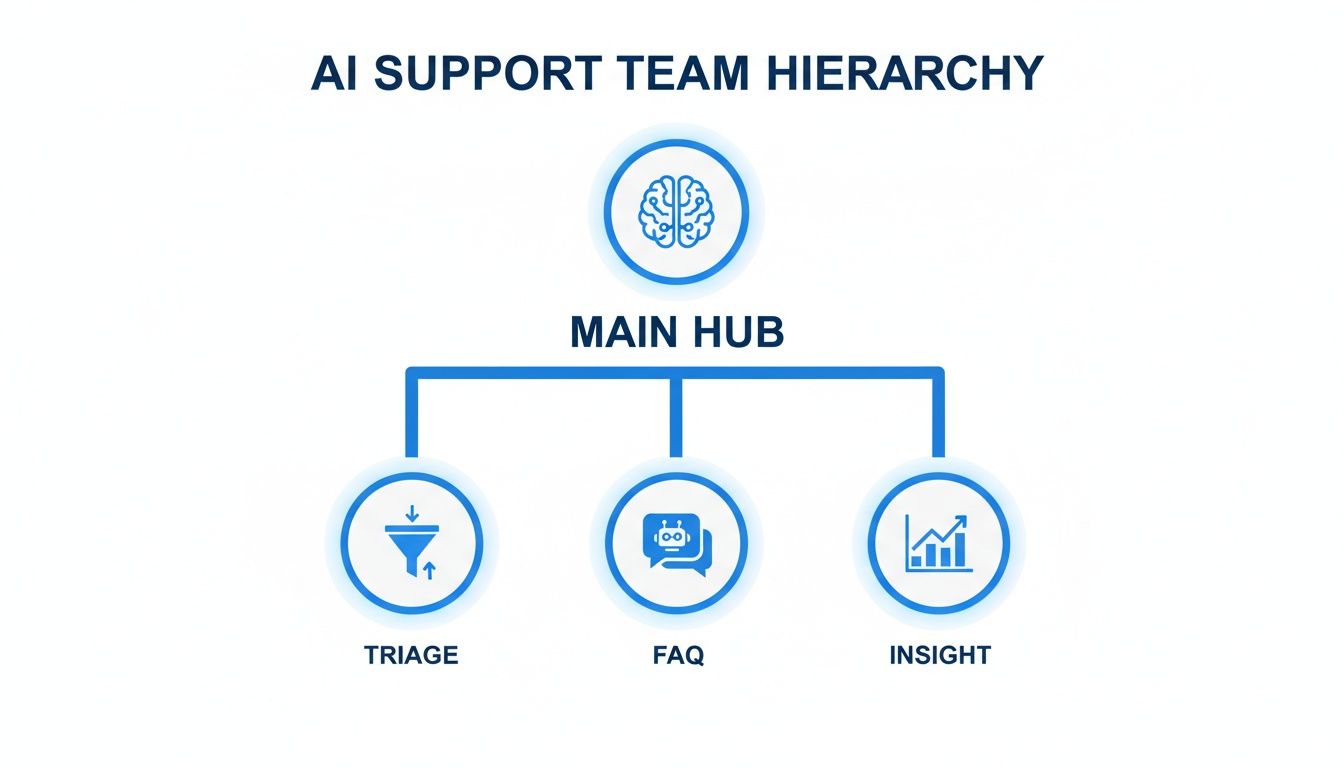
As you can see, a central AI hub acts like a dispatcher, sending each customer query to the right place. This ensures every issue is handled by the best resource, whether that’s an automated system or a person.
Automated Ticket Management And Routing
At its heart, good AI support software creates order out of chaos. The moment a customer email or chat message comes in, the system reads it, figuring out what the customer wants, how urgent it is, and what it's about.
This quick, smart analysis kicks off a few key actions right away:
- Categorization: It automatically tags tickets with useful labels like "return request" or "shipping question," keeping everything neat and organized.
- Prioritization: It spots urgent issues, like a problem from a VIP customer, and bumps them to the top of the list.
- Routing: It sends the ticket directly to the right person or department, cutting out the clumsy manual hand-offs.
The impact here is instant. You slash response times, deliver more consistent service, and make sure no customer request ever gets lost in the shuffle. This one feature alone can turn a messy inbox into a well-oiled machine.
Intelligent Chatbots And AI Agents
Today's AI chatbots are a world away from the clunky FAQ bots of the past. Using Natural Language Processing (NLP), they can have surprisingly real conversations, remember what was said earlier, and solve problems that take multiple steps—all without needing a human to jump in. To get the most out of them, it helps to understand the full range of modern AI chat features available.
These AI agents can:
- Provide instant answers 24/7 to the most common questions.
- Walk customers through troubleshooting steps, one at a time.
- Collect all the basic info from a customer before passing the conversation to a human agent.
This is a massive boost for efficiency. We're seeing businesses report that AI agents can successfully handle up to 80% of routine customer questions. This frees up your team to focus on building relationships and solving the complex issues that really matter. If you want to see what this looks like in practice, you can explore the full suite of MAILO AI features that make this automation happen.
By handling the high-volume, simple tickets, AI agents don't just reduce costs. They elevate the role of your human support team, turning them from ticket-closers into genuine customer advocates.
Integrated Knowledge Base And Self-Service Portals
A huge part of modern support is giving customers the tools to find answers on their own. AI support software is brilliant at this because it connects directly to your help center or knowledge base.
This connection works in two really powerful ways. First, when a customer asks a question, the AI chatbot can instantly find and share the right help article right in the chat, solving the problem on the spot.
Second, the AI is always listening. It analyzes support chats to find gaps in your help content. If it sees dozens of customers asking the same question that isn't in your FAQ, it flags it for you. This creates a feedback loop where your help center is constantly getting better based on what your customers are actually asking for. The end result? More empowered customers and fewer support tickets over time.
Choosing the Right AI Support Software for Your Team
With so many AI support tools out there, picking the right one can feel overwhelming. It’s easy to get lost in flashy feature lists. The real key is to sidestep the hype and focus on what your business actually needs to thrive.
Think of it like hiring a new team member. You wouldn't just look at a resume; you'd want to know how they fit with your team, solve your specific problems, and grow with the company. The right software should feel like that perfect hire—a natural part of your workflow, not just another complicated system to manage.
Start by Defining Your Core Needs
Before you even book your first demo, take a look inward. What are the biggest headaches in your current support process? Are your agents drowning in repetitive “Where is my order?” tickets? Is your team struggling to juggle conversations from email, chat, and social media all at once?
Figure out your top 3-5 support challenges. This simple exercise creates a powerful scorecard for every tool you look at. It turns a vague search into a focused mission to solve real, measurable problems.
Jot down a checklist of your absolute must-haves. This isn't about the "nice-to-have" bells and whistles; it's about the core functions your team can't live without. This clarity is your best defense against slick marketing, helping you zero in on what truly matters for your agents and customers.
The Essential Evaluation Checklist
Once you know what you’re solving for, use this checklist to put different AI support platforms to the test. A truly great solution will check all of these boxes.
1. Seamless Integration Capabilities
Your support software can't be an island. It needs to talk to the other tools you depend on every single day to run your business.
- Your E-commerce Platform: For any online store, a deep, native integration with platforms like Shopify is non-negotiable. This is what allows the AI to pull live order information and give customers accurate, instant updates on shipping, returns, and inventory.
- Your CRM and Other Tools: Check for solid connections to your Customer Relationship Management (CRM) software, like Salesforce or HubSpot, and even internal chat apps like Slack. When your tools are connected, you eliminate data silos and give your team a 360-degree view of every customer.
2. Scalability for Future Growth
The software that works for you today needs to be able to handle your business tomorrow. Think about how the platform will perform when your ticket volume doubles during Black Friday or as you expand into new markets. A scalable tool grows with you, so you won't face a painful and expensive switch in a year or two.
3. An Interface Your Team Will Actually Use
Even the smartest AI is worthless if your team finds it clunky and confusing. The agent dashboard should be clean, intuitive, and easy to navigate. The goal is to find a tool that makes their jobs easier and more efficient from day one, not one that adds another layer of complexity.
4. Robust Analytics and Reporting
You can't improve what you don't measure. The software must have clear, easy-to-read dashboards that give you real insight into your support performance. Make sure you can track:
- Ticket Volume and Resolution Times: How many inquiries are you getting, and how fast are they being resolved?
- Customer Satisfaction (CSAT) Scores: Are your customers actually happy with the support they’re getting?
- Automation Performance: What percentage of tickets is the AI handling on its own? This is often called the deflection rate.
5. Great Vendor Support and Onboarding
When you run into a problem, how good is the company behind the software? Look for a partner, not just a provider. A great vendor offers thorough onboarding, a helpful knowledge base, and responsive human support. This is what ensures you get the most out of your investment.
6. Strong Data Security Protocols
Last but certainly not least, you’re trusting this software with your customers’ sensitive information. Verify that the vendor follows strict security standards, like end-to-end data encryption, and is compliant with data privacy regulations like GDPR. Your customers' trust is everything, and protecting their data has to be a top priority.
Bringing Your AI Support Strategy to Life: Implementation and Measurement
Picking the right AI customer support software is a fantastic first step, but the real magic happens when you weave it into your daily workflow. Launching an AI strategy isn't like flipping a switch; it's a careful process that turns powerful technology into real, measurable business results. A phased approach is key to making sure the transition is smooth for both your team and your customers.
This journey is all about transforming your support from a manual, reactive function into a smart, proactive system. By breaking down the implementation into clear, manageable stages, you can build momentum, gather feedback, and show value at every turn. Think of it like building a house: you pour a solid foundation before you start putting up the walls.
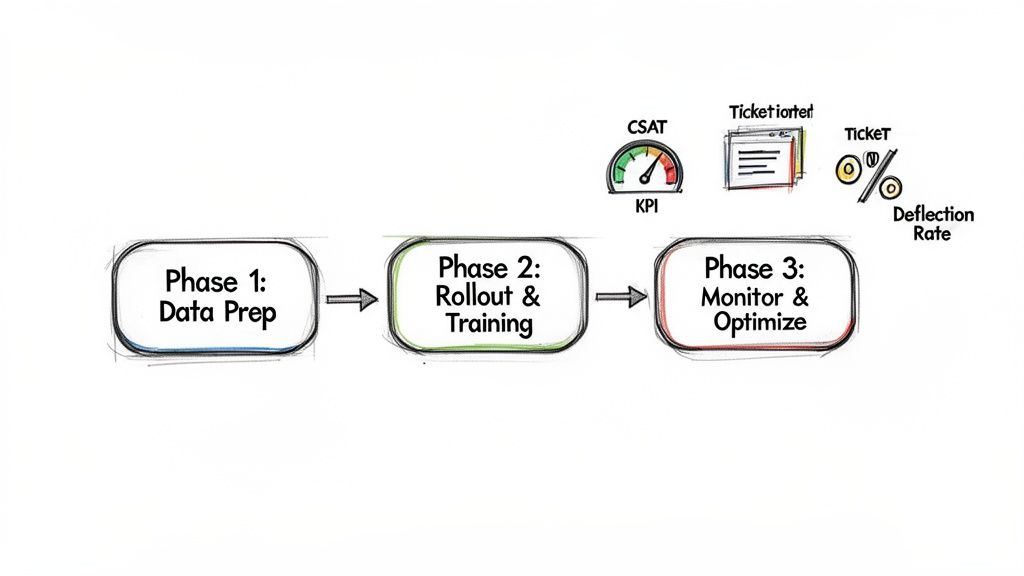
Phase 1: Laying the Groundwork with Goals and Data
The first phase is all about preparation. Before you even think about automating a single ticket, you have to define what success actually looks like for your business. Are you trying to slash your first response time? Handle more customer queries without hiring? Or maybe just make customers happier? Set clear, specific goals from the outset.
Next up is data prep. Your AI is only ever going to be as smart as the information you feed it. This means getting your house in order: organizing your help desk articles, tidying up historical support tickets, and double-checking that all your product info is accurate. This upfront effort is what allows the AI to deliver correct, on-brand answers from day one.
Phase 2: A Smart Rollout and Team Training
With a solid foundation in place, it’s time to go live. But don't just open the floodgates. Instead of launching the AI to all of your customers at once, start small with a controlled group. You could, for example, enable it on a single channel like email or have it tackle just a few of your most common questions. This phased rollout minimizes risk and lets you fine-tune the system based on real-world feedback.
At the same time, you need to bring your human agents on board. This isn't about teaching them to compete with the AI—it’s about teaching them to work with it. Show them how the new software will take over the repetitive, soul-crushing tasks, freeing them up to solve the complex, high-impact problems that require a human touch. When agents see the AI as a helpful sidekick instead of a replacement, adoption becomes a breeze.
For a more detailed look at the process, check out our guide on how to automate customer service.
A successful AI implementation doesn't replace your team; it empowers it. The goal is to create a partnership where technology handles the volume, and your people provide the empathy and critical thinking.
Phase 3: Constant Monitoring and Fine-Tuning
An AI support strategy is never truly "done." This final phase is an ongoing loop of monitoring, learning, and improving. You have to keep a close eye on your key performance indicators (KPIs) to see what’s working and what needs tweaking. This continuous feedback cycle is what turns a good AI tool into an indispensable one.
But which metrics should you actually be watching? Tracking the right data is the only way to prove the value of your AI customer support software and justify the investment.
Here are the three most important metrics to keep on your dashboard:
-
Ticket Deflection Rate: This is the percentage of customer questions that the AI resolves completely, without a human agent ever needing to step in. A good starting goal is a 20-30% deflection rate, which can climb much higher as the AI learns and improves. It’s a direct measure of efficiency and cost savings.
-
AI-Driven CSAT Scores: Don't just look at your overall Customer Satisfaction (CSAT) score. You need to specifically track the scores for interactions handled only by the AI. This tells you whether your automated support is genuinely helpful or just causing frustration. The goal is to get your AI-driven CSAT on par with your human agent scores.
-
Containment Rate: This metric focuses on how many conversations start and end within an automated channel (like a chatbot) without ever being escalated to a person. A high containment rate—ideally over 70% for common issues—proves your AI is effectively solving problems from beginning to end.
By following these phases and focusing on these concrete metrics, you can confidently implement your AI strategy and clearly demonstrate its positive impact on your business.
Getting Real About Security and Pricing
When you're ready to pick an AI customer support tool, it really boils down to two things: security and price. You absolutely need a platform that protects your customer data like a fortress, but it also has to make sense for your budget. Nailing these two points is key to finding a tool you'll stick with for the long haul.
Let's be blunt: protecting customer information isn't optional. AI systems will be handling sensitive details, so you have to trust that your provider takes security seriously. A data breach is more than just a PR nightmare; it shatters the trust you’ve worked so hard to build with your customers.
What to Look For in Security
You don't need to be a cybersecurity guru to vet a platform. You just need to know what to ask. Look for providers who are upfront about their security measures and can show you how they protect data from end to end.
Here are the non-negotiables to check for:
- Data Encryption: This is table stakes. It means the provider scrambles your data, making it useless to anyone who shouldn’t have it. Make sure they use strong, end-to-end encryption for data both while it’s moving across the internet (in transit) and when it’s sitting on their servers (at rest).
- Access Controls: This is all about who on your team can see what. Good software lets you set permissions so agents can only access the customer information they need to do their job. It’s a simple way to minimize internal risks.
- Compliance Certifications: Look for proof that they follow major data privacy rules, like GDPR. This isn't just a logo on a website; it’s a sign that the company is serious about meeting high global standards for data protection.
Making Sense of Pricing Models
Once you're confident your data is safe, it’s time to talk money. You need a pricing plan that fits your business today but won't hold you back as you grow. A great way to get a feel for the market is to look at different examples, like Selzee's pricing models, to see how various companies structure their plans.
Most ai customer support software providers lean on one of three common models.
Choosing the right pricing model is about balancing today's budget with tomorrow's needs. A plan that seems cheap now could become expensive as you scale, so think ahead.
Let's break down how they typically work.
| Pricing Model | How It Works | Best For | Potential Downside |
|---|---|---|---|
| Per-Agent Billing | You pay a set fee every month for each person on your team using the software. | Teams with a consistent size and steady support volume. | Can get expensive quickly as your support team grows. |
| Usage-Based Plans | Your cost is tied to volume—think number of tickets resolved or conversations handled. | Businesses with seasonal spikes or unpredictable support needs. | Your monthly bill can be hard to predict and might jump during busy seasons. |
| Tiered Packages | You pick a package (like Basic, Pro, Enterprise) where each tier unlocks more features for a higher price. | Stores that want to start with the basics and add more power as they scale. | You might find a must-have feature is only available in a pricier tier. |
Taking the time to weigh these models against your own business will help you find that sweet spot between security and affordability. For a clear example of transparent plans built for growth, check out the MAILO AI pricing tiers. They're designed specifically for Shopify stores, helping you find a plan that works for you right now and scales with you down the road.
Have Questions About AI Support Software? We've Got Answers.
It's natural to have a few questions before bringing a new tool into your business. Getting a handle on how AI customer support software works in the real world is the first step toward making a smart decision. Here are the answers to the most common questions we hear from e-commerce brands just like yours.
We've kept the answers direct and to the point—no fluff, just the information you need. We'll touch on everything from job roles and setup time to whether this kind of tech is the right fit for your business, no matter its size.
Will AI Customer Support Software Replace My Human Agents?
Nope, and that's not the goal. Think of AI software as a super-efficient assistant for your support team. It’s designed to handle the repetitive, high-volume questions that can bog down your agents and lead to burnout.
By automating those routine tasks, you free up your human experts to focus on the complex, high-stakes customer issues. These are the conversations that truly need a human touch—the ones that require empathy and creative problem-solving to build real, lasting customer relationships.
How Long Does It Take to Implement an AI Solution?
The timeline can vary, but modern AI tools are built to get you up and running fast. A simple AI chatbot that pulls answers from your FAQ page can be live and helping customers in just a couple of days.
A more advanced setup, like fully integrating the AI with your Shopify store and CRM, might take a few weeks. The best AI customer support software, however, comes with guided onboarding and simple dashboards to make the process as painless as possible, so you start seeing results quickly.
The trick is to find a tool that’s designed for a quick launch. A drawn-out, complicated setup just delays the benefits, but a user-friendly platform can start saving you time and boosting customer happiness almost right away.
Is This Technology Only for Large Enterprises?
Not anymore. While huge companies were the first to jump on board, things have changed. Today, many AI support tools are built—and priced—specifically for small and medium-sized businesses, especially those in e-commerce.
With flexible pricing and easy-to-manage interfaces, even a one-person Shopify store can use AI to its advantage. It lets you offer the kind of instant, 24/7 support that was once only available to the big players, helping you compete on a whole new level of customer experience.
Ready to see how AI can turn your support emails into a source of growth? With MAILO AI, you can automate responses, delight customers, and free up your team to focus on what matters most. Start your free trial today.