

Think of your Shopify customer service email as more than just a support channel. For most store owners, it’s a necessary chore. But if you look closer, you’ll find it’s a hidden growth engine for your brand—a goldmine for building the kind of loyalty that fuels repeat business and skyrockets customer lifetime value.
Why Your Shopify Email Inbox Is A Growth Engine
It's easy to fall into the trap of treating your support inbox as a place to just put out fires. But that reactive mindset misses the bigger picture. Every single email from a customer is a touchpoint, a fork in the road where you can either strengthen a relationship or lose someone for good.
When you get it right, these interactions do more than just solve a problem; they create genuine brand advocates.
This is all about shifting from simple problem-solving to proactive relationship-building. You're not just answering a question about shipping times; you're delivering an experience. A fast, personal, and genuinely helpful reply can turn a frustrated buyer into a loyal fan far more effectively than most of your marketing budget ever could.
Email's Unbeatable Role In Ecommerce
While other channels have their place, email remains the backbone of communication for online stores. It's direct, it's documented, and it's the primary channel for all those crucial post-purchase interactions—think order confirmations, shipping updates, and, of course, support queries.
This isn't just a hunch; the data backs it up. Email is the clear powerhouse for Shopify merchants. A deep dive shows that 59% of all Shopify stores prominently feature a customer service email, blowing past phone support, which only shows up on 34% of sites. This makes total sense when you consider that returning customers drive nearly 41% of total sales—and keeping them happy starts in the inbox.
Your support inbox isn't a cost center; it's a retention machine. Every resolved ticket and positive interaction is an investment in customer lifetime value, creating a powerful competitive edge that's difficult for others to replicate.
While live chat and social media are great for quick, top-of-funnel questions, email is where the real post-purchase relationship is nurtured. Here’s a quick breakdown of how it stacks up against other channels.
Email Support vs Other Channels A Shopify Perspective
| Support Channel | Prevalence on Shopify Stores | Primary Use Case | Scalability Potential |
|---|---|---|---|
| Email Support | Very High (59%) | Detailed post-purchase issues, order inquiries, returns, and relationship building. | High (with automation, templates, and AI) |
| Phone Support | Moderate (34%) | Urgent, complex issues that require immediate, direct conversation. | Low (resource-intensive, hard to scale) |
| Live Chat | Growing | Pre-sale questions, quick troubleshooting, and converting hesitant shoppers. | Medium (requires real-time staffing) |
| Social Media DMs | High | Quick questions, brand engagement, and public-facing issue resolution. | Medium (can become overwhelming quickly) |
As you can see, for handling the detailed, nuanced conversations that build trust and loyalty after a sale, email is still king. It provides the space and permanence needed to properly resolve issues and leave a lasting positive impression.
Turning Support Interactions Into Sales
At the end of the day, a well-oiled Shopify customer service email strategy directly feeds your bottom line. It's what builds the trust that leads to repeat purchases and gets people talking about your brand in a good way.
To really get this right, you need to blend great service with smart communication. Mastering a few core Shopify email marketing strategies can turn your support channel into a source of sales and conversions. And if you want to keep that inbox from spiraling out of control, you might want to check out our guide on the https://mailo.ai/blogs/customer-support-automation/inbox-zero-method for a more organized workflow.
Building Your Foundational Email Workflow
Before we even think about fancy automation or AI, we need to get the basics right. A chaotic, overflowing inbox is the number one enemy of good customer service. It's how emails get missed, replies take forever, and customers get angry. So, our first goal is to build a simple, manual system to bring some order to your Shopify customer service email process. This ensures nothing falls through the cracks.
The first move is to graduate from Shopify's default contact form setup. While it's a decent start, funneling every single message—from sales questions to urgent return requests—into one generic inbox is a recipe for disaster. You need a dedicated, professional address like support@yourstore.com or help@yourstore.com. This small change does two things: it tells customers their message is going to the right place, and it makes managing the inbox infinitely easier as you grow.
Setting Up Your Triage System
With a dedicated support address in place, it's time to create a manual triage system inside your email client. Think of it as setting up digital filing cabinets for different customer issues. This manual sorting is your first line of defense against feeling completely overwhelmed.
Here’s a practical folder structure I always recommend starting with:
- Returns & Exchanges: For any and all requests to send items back or swap them out.
- Order Status (WISMO): You know this one—it’s for all the "Where Is My Order?" tickets.
- Product Questions: This covers both pre-sale questions and post-purchase inquiries about how to use something.
- Damaged/Incorrect Items: These are the high-priority, "fire-alarm" issues that need a fast resolution.
- General Inquiry: A catch-all folder for everything else that doesn't fit neatly into another category.
This simple setup allows anyone on your team to quickly categorize new emails and tackle the most urgent ones first. That "damaged item" email can be handled long before a general question about a product, which makes a huge difference in the customer's experience.
The core idea is simple: every email needs a home. An organized inbox isn't just about being neat; it's a strategic tool for delivering consistent, reliable support, especially when things get crazy during sales like Black Friday Cyber Monday.
By default, Shopify's contact form just sends everything to the email you've listed in your store's general settings.
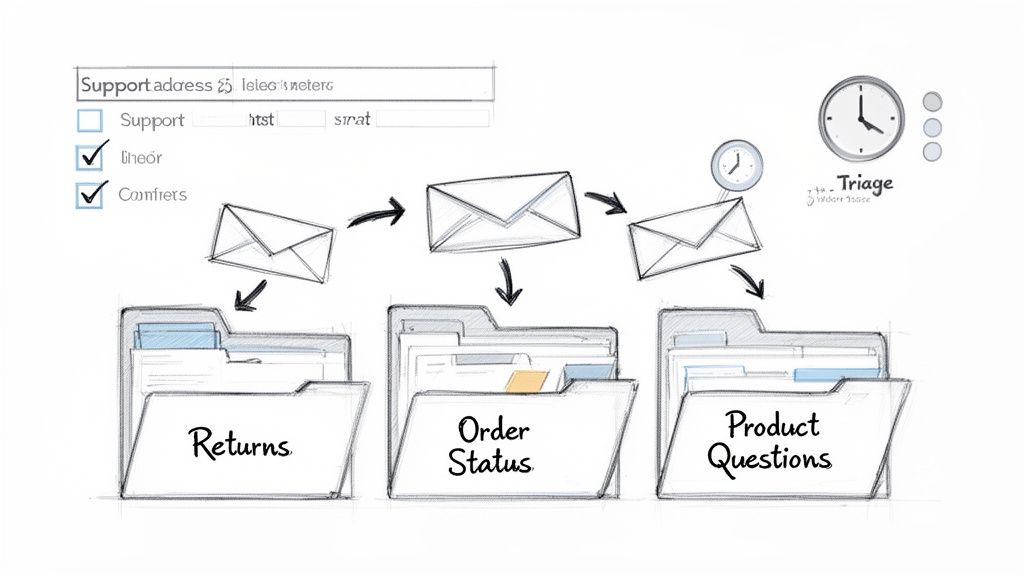
The standard Shopify setup is functional, but it really lacks the structure you need to scale your support without pulling your hair out.
By pointing that contact form to your new support address and using this folder system, you turn a basic feature into the bedrock of an efficient workflow. Getting this foundational organization right is non-negotiable before you start adding templates and automation. It ensures your manual process is solid, so you don't end up just automating a chaotic system. Everything you build from here on out will rest on this groundwork.
Writing Brand-Safe Templates That Actually Help
Once your inbox is organized, it's time to focus on what you're actually saying to customers. Generic, robotic replies are a surefire way to make a customer feel like just another ticket number. An effective Shopify customer service email doesn't just fix a problem—it reflects your brand's personality and makes people feel genuinely cared for.
This isn't about creating stiff, unchangeable scripts. It's about building a toolbox of flexible templates for common questions. Think of them as solid starting points that your team can grab, personalize, and send off quickly. This way, you get the best of both worlds: brand consistency and a real human connection.
The Anatomy of a Great Support Email
Every great support email, no matter the specific issue, shares a few key ingredients that build trust and provide clarity. Nailing this structure is the foundation for any template you create.
- A Clear Subject Line: This is non-negotiable. Always include the order number, like "Re: Your Shopify Order #12345." It immediately gives the customer context and helps them find the email later.
- An Empathetic Opening: Start by acknowledging their problem. A simple "I'm so sorry to hear the item arrived damaged" shows you're listening and you care. It goes a long way.
- The Solution or Next Steps: Get straight to the point. Clearly explain what you're doing to resolve the issue. Ditch the corporate jargon and be direct.
- A Personal Touch: Use their name! If you can, reference a past purchase or a small detail from their message. It shows you're paying attention and they aren't just a number to you.
This simple framework can turn a frustrating situation into a surprisingly positive brand experience. The magic happens when you blend efficiency with a human touch, making sure the customer feels like they’re talking to a person, not a bot.
Practical Templates for Common Scenarios
Let's put theory into practice. Here are a couple of starting points for the emails you'll likely send every single day. The key is to tweak the tone to match your brand, whether you're fun and playful, buttoned-up and formal, or clean and minimalist.
Example 1: The "Where Is My Order?" (WISMO) Inquiry
Subject: Update on your order #{{order_number}}
Hi {{customer_first_name}},
Thanks for reaching out! I've just checked on your order, and it's currently on its way to you.
You can track its progress directly here: [Insert Tracking Link]
It looks like it’s scheduled for delivery around [Date]. Please let me know if there's anything else I can help with!
Example 2: Damaged Item Report
Subject: Regarding your recent order #{{order_number}}
Hi {{customer_first_name}},
I'm so sorry to see that your package arrived damaged—that's definitely not the experience we want for you.
We're getting a replacement sent out to you right away, and you can expect a new shipping confirmation email within 24 hours. There's no need to return the damaged item.
We really appreciate your patience.
These aren't just canned responses; they are powerful tools for building loyalty. While 70% of Shopify Inbox conversations happen pre-purchase, your follow-up emails are where you truly earn a customer's trust for the long haul. This is huge, considering that returning customers can drive 41% of sales. Smart, personalized post-purchase care is what keeps them coming back. You can find more customer service insights and how they impact sales on Shopify’s official blog.
For a deeper dive into writing effective replies, take a look at our guide on automated email response templates. It’s packed with more examples to help you make every Shopify customer service email feel personal, even when it starts from a template.
Supercharging Your Inbox With AI And Automation
Once you've got your foundational workflow running smoothly, it's time to get your most valuable asset back: your time. Let's be honest, manually handling every single Shopify customer service email is a recipe for burnout and just isn't scalable. This is where you graduate from an organized manual system to a smarter, faster workflow powered by automation and AI.
This isn't about replacing your team with robots. It's about giving them superpowers. Tools like Mailo AI handle the repetitive, mind-numbing tasks, which frees up your team to tackle the complex, high-touch issues that actually require a human brain.
The Shift From Manual To Intelligent Workflows
Imagine an inbox that organizes itself. Instead of your team spending hours dragging emails into folders for "Returns" or "Order Status," AI does it instantly the moment a message arrives. This automatic email classification is often the first, most game-changing benefit you'll see.
The system reads an email, understands what the customer needs, and tags it correctly. A message saying "my order hasn't arrived" is immediately labeled as a "Where Is My Order?" (WISMO) request. Another one mentioning "it doesn't fit" gets categorized as a return.
This single change ensures high-priority tickets jump to the front of the line and nothing gets lost in the noise. It essentially puts your manual triage process on autopilot, saving a surprising number of hours each week. For a deeper dive, our guide on the mechanics of Shopify email automation breaks this down step-by-step.
This visual below outlines the three core pillars of a great support email—something AI can help you nail every single time.
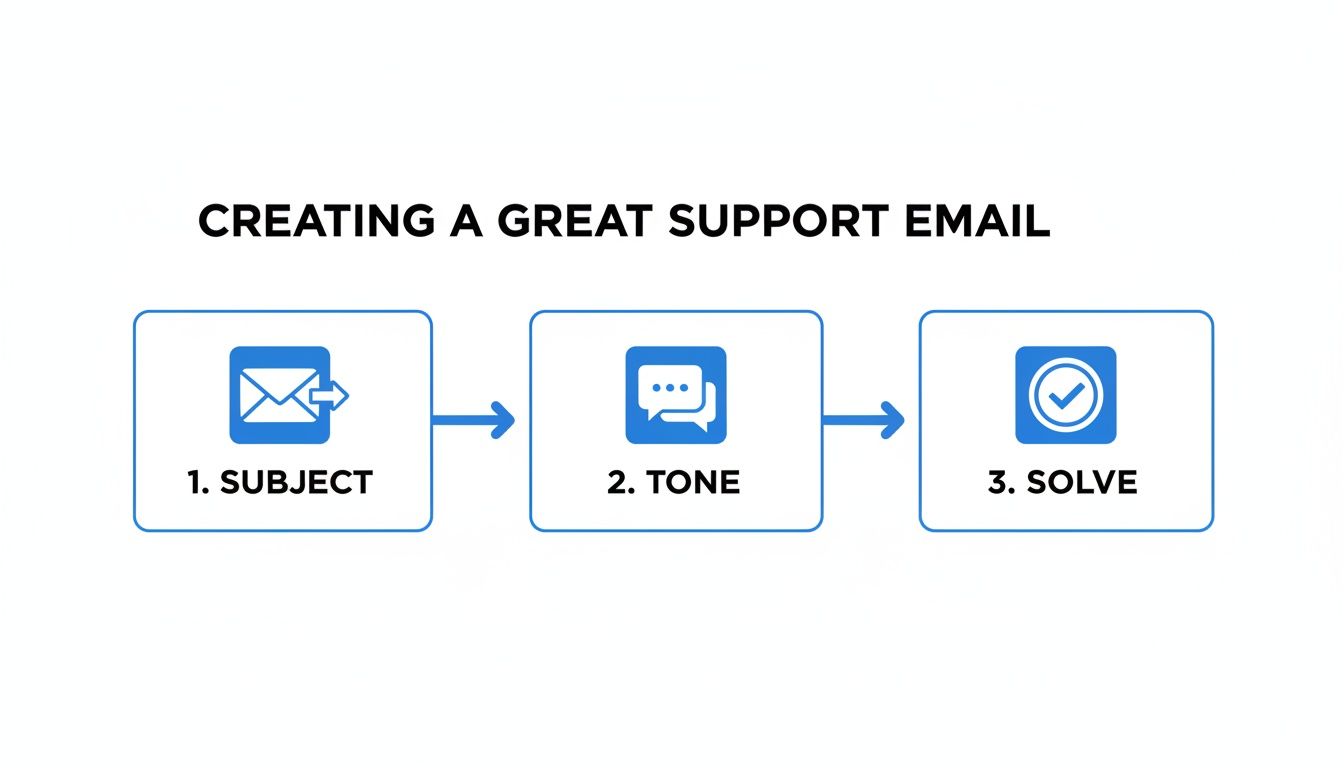
Getting the subject, tone, and solution right is the bedrock of any successful customer interaction, and the consistency automation brings is a huge advantage.
AI-Generated Drafts For Instant Replies
Sorting is great, but the real magic happens when AI starts helping you write the replies. The best modern tools can generate instant, on-brand draft responses that your team just needs to review and send with a single click.
Let's walk through a classic example: a customer emails you asking, "Where is my order?"
-
The Old Way: Your agent opens the email, copies the order number, opens another tab for Shopify, finds the order, copies the tracking link, clicks back to the email, and then starts typing out a friendly reply. Doing this dozens or hundreds of times a day is a massive time sink.
-
The Smart Way: An AI tool like Mailo AI, which plugs directly into Shopify, recognizes the WISMO request instantly. It automatically pulls the customer's order data and generates a perfect draft reply, complete with the real-time tracking link and estimated delivery date. Your agent just glances at it and hits "send."
What used to be a two-minute, multi-step chore becomes a five-second review. That dramatic time-saving is how you turn a good customer experience into an incredible one.
To put the time savings into perspective, here's a quick look at how the hours spent on common tasks stack up when comparing a manual process to an AI-powered one.
Manual vs AI-Powered Email Support Workflows
This table illustrates the practical differences in handling common Shopify support tasks with a traditional manual approach versus an AI-driven platform like Mailo AI.
| Task | Manual Workflow (Hours/Week) | AI-Powered Workflow (Hours/Week) | Key Benefit of Automation |
|---|---|---|---|
| Email Sorting & Tagging | 5-7 hours | 0 hours | Frees up agents from administrative inbox management. |
| WISMO Inquiries | 8-10 hours | 1-2 hours | Drastically cuts down on the most common repetitive query. |
| Return & Exchange Requests | 6-8 hours | 2-3 hours | Speeds up the resolution process for a critical customer touchpoint. |
| Product Questions | 4-5 hours | 1-2 hours | Provides faster, more accurate pre-sale support. |
The numbers speak for themselves. Shifting these tasks to an AI-powered system doesn't just make things faster; it fundamentally changes where your team can focus their energy—on building relationships and solving complex problems instead of copying and pasting tracking numbers.
Measuring The Metrics That Actually Matter
You can't improve what you don't measure. It’s a cliché for a reason. Having a slick, automated Shopify customer service email system is great, but if you aren't tracking the right data, you’re just guessing about its real impact.
It’s time to look past vanity metrics, like the total number of tickets closed. We need to dig into the key performance indicators (KPIs) that actually tell the story of your support operations and how they affect your bottom line.
This means focusing on numbers that reflect speed, quality, and overall efficiency. When you get a handle on these metrics, you can spot bottlenecks before they become major problems, train your team where they really need it, and actually prove the value of your customer support efforts.
Core Metrics For Ecommerce Support
For any growing Shopify store, some metrics just matter more than others. Instead of getting lost in a sea of data, let's concentrate on the "big three" that give you the clearest picture of how you're really doing.
- First Response Time (FRT): This is just what it sounds like—how long it takes for a customer to get that first reply after they hit "send." In ecommerce, speed is a huge part of the experience. A low FRT tells customers you're on the ball and you value their time, which is a massive driver of satisfaction.
- Customer Satisfaction (CSAT) Score: This is your direct line to customer sentiment. It’s usually measured with a simple, post-interaction survey asking something like, "How satisfied were you with your support experience?" This gives you an immediate pulse check on the quality of your help.
- Resolution Rate: This tracks the percentage of support tickets you successfully close on the first touch. A high first-contact resolution rate is a sign of an efficient team and clear, effective answers. It saves everyone from those frustrating back-and-forth email chains.
Keeping an eye on these three KPIs is like having a powerful, at-a-glance dashboard for your support health. They help you answer the most important questions: "Are we fast enough?" and "Are our solutions actually helping people?"
The goal isn't just to close tickets; it's to close them in a way that leaves the customer feeling heard, valued, and happy with the outcome. Your metrics should always reflect this human-centric approach to support.
Your Shopify customer service email performance is constantly being tested against sky-high customer expectations for speed and personalization. Think about this: 73% of customers say they'll switch to a competitor after just one bad experience.
This really drives home how vital it is to measure and fine-tune every interaction. To get a better handle on the effectiveness of your email strategy, it's worth understanding the essential customer success metrics for SaaS growth.
Using Data To Drive Improvement
Once you start tracking these numbers, you can use what you learn to make smarter business decisions.
Is your First Response Time suddenly spiking? That could mean you need more hands on deck during peak hours or that a new product launch is causing a wave of confusion. Seeing a dip in your CSAT score? Maybe it's time to revisit your email templates or provide more training on handling tricky situations.
This data-driven approach transforms your support team from a reactive cost center into a proactive, strategic part of your brand.
Common Questions About Shopify Email Support
Even with a perfectly tuned workflow, you're going to run into some recurring questions when managing your Shopify customer service email. Let's walk through some of the most common hurdles I see store owners face and get you some practical, no-fluff answers.
How Can I Reduce The Number Of WISMO Emails?
"Where Is My Order?" inquiries can feel like death by a thousand cuts. The secret to cutting them down is to be relentlessly proactive. You have to beat your customers to the punch.
Don't wait for them to ask for an update. Instead, use a Shopify app that pushes out branded tracking notifications automatically. Think: an email when it ships, another when it's out for delivery, and a final one when it hits their doorstep.
Also, take a hard look at your initial order confirmation email. Does it clearly state the estimated delivery window? Does it have a big, obvious link to a live tracking page? These small details can deflect a surprising number of these emails before they’re ever written. An AI tool can also be a game-changer here, instantly serving up tracking info the second a customer asks, so your team never even sees the ticket.
What Is The Best Way To Handle Angry Customers?
When an angry email lands, your first move should always be a blend of speed and empathy. The goal isn't to win an argument; it's to de-escalate the situation and show the customer you're genuinely there to help.
Kick off your reply by validating their feelings. Don't jump straight into a solution. A simple opener like, "I'm so sorry to hear about your experience; that's completely unacceptable and I understand why you're frustrated," goes a long, long way.
From there, a few ground rules:
- Don't get defensive: It’s the fastest way to lose the customer forever. No excuses.
- Present a clear solution: Tell them exactly what you're going to do to fix it.
- Empower your agents: Give your team the leeway to offer a small discount or store credit. It’s a small price to pay to save a customer relationship.
This approach flips the script. You’re no longer just fixing a problem; you're turning a potential one-star review into a moment that actually builds loyalty.
Should I Use A Separate Email For Customer Service?
Yes. One hundred percent, yes. Using support@yourstore.com instead of a generic info@ address isn't just about looking professional—it's about staying sane as your business grows.
A dedicated support address is the foundation for a scalable system. It lets you:
- Plug it directly into a helpdesk or an AI support platform.
- Create specific automations and routing rules without messing up your personal or sales inboxes.
- Keep a clean line between customer issues and all other business chatter.
Think of it as the first, crucial step to building a real support workflow, especially as you add team members and your ticket volume climbs.
How Quickly Should I Respond To Emails?
You should aim to get an initial, human response back to every customer within 12-24 hours during the business week. But let's be honest, in the world of ecommerce, faster is always better.
A great first step is setting up an immediate auto-reply. It's a simple courtesy that confirms you got their message and sets a clear expectation (e.g., "Thanks for reaching out! Our team will get back to you within 24 hours.").
If you want to deliver truly top-tier service, AI tools can give customers an instant, helpful first reply for common questions. This doesn't just make you look good; it crushes your average response time and keeps shoppers happy.
Ready to stop manually sorting emails and start delivering instant, on-brand replies? MAILO AI integrates directly with Shopify to automate your support, resolve issues faster, and turn your customer service into a true growth engine. Start your free trial today.