

Picture your customer support inbox as a chaotic, disorganized mailroom. Questions, returns, and order issues are just dumped in a giant pile with no rhyme or reason. A help desk service is what comes in and turns that mess into a high-tech, streamlined command center. It’s the tool that gets your Shopify store out of a jumbled shared inbox and into a workflow that actually works.
What Exactly Are Help Desk Services in E-commerce?
Help desk services are the operational backbone for any serious e-commerce brand's customer support. In simple terms, a help desk is a software platform built to manage and solve customer problems systematically and efficiently. Forget scattered emails and messy spreadsheets; this is an intelligent hub for your entire support operation.
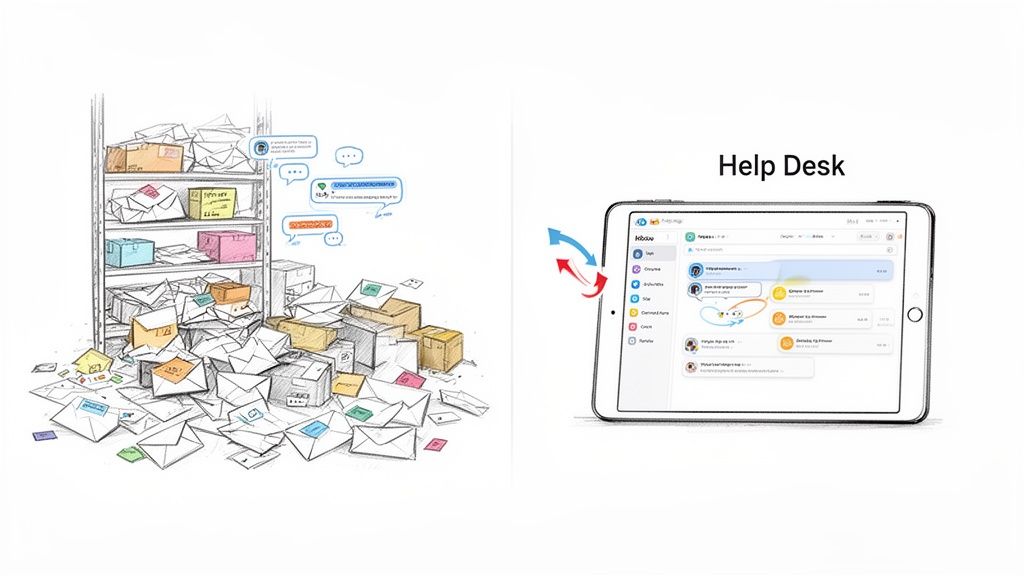
This system pulls all your customer conversations—from email, live chat, social media messages, and contact forms—into one unified dashboard. Your team no longer has to jump between different accounts to see what's going on. Every new message that comes in is logged as a "ticket," which is just a neat, trackable record of that entire customer conversation, from the very first hello to the final resolution.
Moving Beyond the Shared Inbox
Most new Shopify stores start with a shared email like support@yourstore.com. It’s simple, and it works... for a while. But as you grow, that shared inbox quickly becomes a major bottleneck. Emails get lost, two different agents accidentally reply to the same customer, and you have zero visibility into how your team is actually performing.
A proper help desk platform is designed to fix all of this by adding structure. It gives you the tools you need to:
- Assign conversations to specific agents so everyone knows who owns what.
- Track the status of every single ticket (e.g., new, open, pending, solved).
- Collaborate behind the scenes using private notes that customers never see.
This organized approach means no customer inquiry ever gets forgotten, and your team can work together like a well-oiled machine, even during your busiest sales seasons.
The Power of Automation and Integration
One of the most powerful features of a modern help desk is its ability to use customer service automation to handle the flood of common questions. Instead of an agent manually looking up an order status every single time, the help desk can be set up to automatically pull tracking info from Shopify and fire back an instant, personalized reply.
By automating all the repetitive, time-consuming tasks, a help desk frees up your support team to focus on what humans do best: handle complex problems, calm down frustrated shoppers, and turn a negative experience into one that builds loyalty.
At the end of the day, a help desk isn't just about managing tickets. It’s about building a highly efficient support engine that lets you deliver faster, more accurate, and more personal help as you scale. This is how you create happy customers who keep coming back.
The Core Features of a Shopify-Ready Help Desk
Not all help desk services are created equal, especially in the fast-paced world of e-commerce. A generic platform might organize your emails, but a help desk built for Shopify acts like a seasoned co-pilot for your business. It’s designed to anticipate your needs and put critical information right at your fingertips.
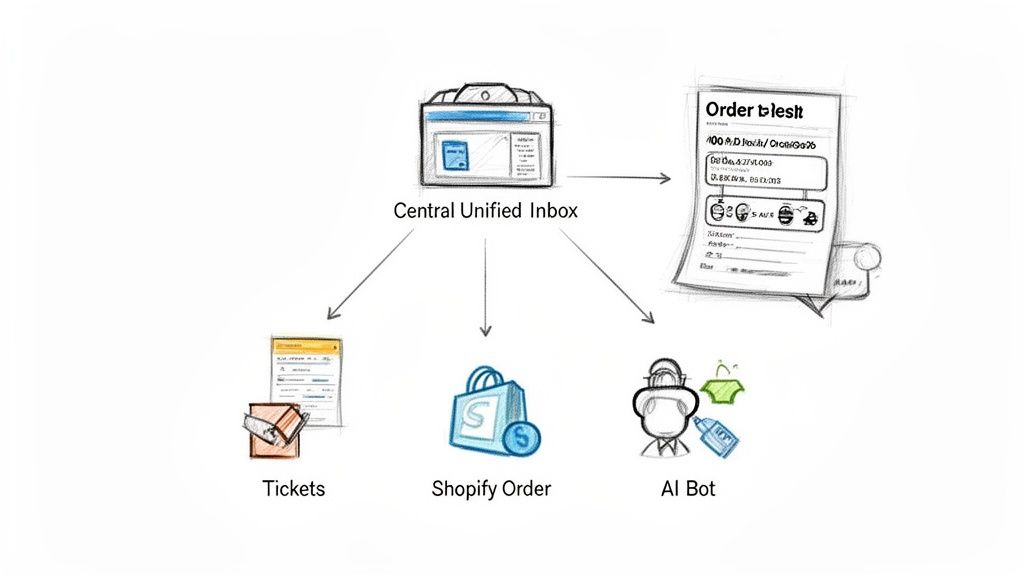
These systems go beyond just sorting messages. They offer a suite of features that help you solve problems faster, make your team more efficient, and ultimately, drive more sales. Let's dig into the non-negotiable features that separate a truly great e-commerce solution from the rest.
Deep Shopify Integration
The absolute must-have feature is a deep, native integration with Shopify. This isn't just a simple connection—it’s about creating a seamless flow of data between your storefront and your support platform.
Think about it: when a customer emails you, their entire order history, shipping status, and contact details should instantly pop up right next to their message. No more frantic tab-switching or searching for an order number. This direct access turns your support agents from information retrievers into expert problem-solvers.
This level of integration allows your team to:
- View Order Details Instantly: See what a customer bought, how much they spent, and where their package is, all from one screen.
- Process Refunds or Cancellations: Issue a refund or edit an order directly from the support dashboard. No extra steps.
- Verify Customer Information: Confirm shipping addresses and contact info with a single click.
A help desk without deep Shopify integration is like a cash register that isn't connected to your inventory. It functions, but it creates endless manual work and slows down every single transaction.
Intelligent Ticket Management and a Unified Inbox
Modern help desks bring every customer conversation into one central hub. This Unified Inbox pulls in messages from email, live chat, and social media, giving you a complete 360-degree view of every customer interaction.
But just having all your messages in one place isn't enough. Smart Ticket Management is what makes that data truly useful. This is the system that automatically sorts, prioritizes, and routes incoming requests.
For example, a "Where is my order?" ticket can get an instant, automated reply. Meanwhile, a message containing the word "damaged" is immediately flagged and assigned to a senior agent. This ensures urgent issues get the attention they deserve, fast.
AI-Powered Automation
Automation is the engine that lets a small team provide enterprise-level support. AI-driven help desks can handle a huge chunk of your common questions without any human effort. They learn from your past conversations to provide instant, accurate, and on-brand answers around the clock.
If your store is growing, a solid automation suite is essential. For a deeper look, check out our guide on the best https://mailo.ai/blogs/customer-support-automation/ai-customer-support-software on the market today. This technology saves countless hours, freeing up your team to focus on the complex, high-value conversations that build real customer loyalty.
Beyond just handling tickets, top-tier platforms also focus on implementing effective web chat solutions for real-time support. While email is still king, giving customers an instant channel for quick questions can be the difference between a sale and an abandoned cart. Managing all these channels through that unified inbox is what makes a great help desk service truly powerful.
To put it all together, let’s look at the essential features every Shopify merchant should demand from their help desk.
Essential Help Desk Features for Shopify Merchants
| Feature | What It Does | Why It Matters for E-commerce |
|---|---|---|
| Unified Inbox | Consolidates customer messages from email, chat, and social media into a single view. | Gives your team a complete picture of every customer conversation, preventing missed messages and context-switching. |
| Deep Shopify Integration | Displays customer order history, shipping status, and details directly alongside their ticket. | Agents can solve problems instantly without leaving the help desk, leading to much faster resolution times. |
| AI-Powered Automation | Uses AI to automatically answer common questions like "Where is my order?" (WISMO). | Frees up your human agents to handle complex issues, saves time, and provides 24/7 support. |
| Ticket Management | Automatically tags, assigns, and prioritizes incoming customer requests based on preset rules. | Ensures urgent issues are handled first and the right questions go to the right team members, improving efficiency. |
| Live Chat | Provides a real-time communication channel on your website for instant customer support. | Reduces cart abandonment by answering pre-purchase questions immediately and boosts customer confidence. |
| Reporting & Analytics | Tracks key metrics like response times, ticket volume, and customer satisfaction (CSAT). | Helps you identify support trends, measure team performance, and make data-driven decisions to improve service. |
Having these core features in place isn't just about managing emails better—it's about building a scalable support system that directly contributes to your bottom line.
What a Modern Help Desk Actually Does for Your Business
Think of a modern help desk as less of an inbox organizer and more of a command center for your entire customer experience. It’s the difference between using a basic calculator and specialized financial software—one just crunches numbers, while the other gives you the insights to actually grow your business. This is how you stop putting out fires and start building a loyal customer base.
The impact isn't just theoretical; it shows up in your bottom line, in your team's sanity, and in your brand's reputation. Let's break down the real-world value a dedicated help desk brings to the table.
Slash Your Support Costs
The first thing you’ll notice is a major drop in what you spend on support. A smart help desk automates the thousands of mind-numbingly repetitive questions that eat up your team's time each week. Think about how often you answer "Where's my order?" or "How do I make a return?" An AI-powered help desk can handle those instantly, no human required.
This means a small, skilled team can suddenly punch way above its weight. Instead of hiring more people every time you have a big sale, you give your current team tools that handle the bulk of the simple questions for them. This keeps your payroll in check and lets your best people focus on the tricky, high-value problems where a human touch really matters.
By automatically clearing out the easy questions and streamlining workflows, a help desk drives down your cost-per-ticket. You can finally handle those Black Friday sales spikes and steady growth without your support budget spiraling out of control.
Boost Customer Satisfaction and Keep Them Coming Back
In e-commerce, speed is king. Customers want answers now, not tomorrow, and a help desk is built for exactly that. When you can provide lightning-fast, accurate responses to common questions, your customer satisfaction (CSAT) scores will climb. Imagine a customer getting a perfect answer to their question at 10 PM on a Sunday—that’s how you build serious trust.
A great experience isn't just a nice-to-have; it directly impacts your customer lifetime value (LTV). Happy customers buy again and tell their friends. It's that simple. A study from Zendesk found that 75% of customers are willing to spend more with businesses that get customer experience right. A modern help desk is your best tool for delivering that kind of service every single time.
It creates a powerful cycle of loyalty:
- Instant Gratification: Customers get what they need in seconds, not hours, leaving them with a great feeling about your brand.
- Always-On Support: With AI, your "doors" are never closed. You’re helping customers long after your team has logged off.
- A Personal Touch: By integrating with Shopify, even automated replies can include specific order details, making the whole experience feel less robotic and more personal.
Turn Customer Feedback into Your Secret Weapon
A help desk isn't just for answering questions; it’s a goldmine of customer intelligence. Every email and chat message is a clue about what your customers are really thinking. By organizing and analyzing these conversations, you can spot trends, catch product issues early, and uncover new opportunities before your competitors do.
Are people constantly asking if a product comes in another color? That’s gold for your product team. Do shoppers keep getting stuck on the shipping page? Your web team needs to know that.
The rapid adoption of these systems tells the story. Help desk software usage has jumped from just 11% in 2020 to 53% in 2024, and it's because the productivity gains are massive. In fact, 86% of support teams say it has made them more productive. As detailed in these IT help desk trends on flairstech.com, AI-powered chatbots are already saving businesses billions by cutting down response times. This data-first approach transforms your support team from a reactive problem-solver into a proactive engine for growth.
How to Choose the Right Help Desk Service for Your Store
Picking a help desk service isn't just another software subscription—it’s like hiring a key team member. Get it right, and it feels like a natural extension of your brand, helping you grow and keeping customers happy. Get it wrong, and you're stuck with a tool that creates friction, burns out your support agents, and leaves customers frustrated.
This guide will give you a straightforward way to make this decision. We'll skip the marketing fluff and focus on what actually matters for a Shopify store like yours. Follow this path, and you'll find a partner that not only solves your current headaches but also grows with you.
Start by Diagnosing Your Current Pains
You can't find the right cure without a proper diagnosis. Before you even look at a single demo, you need to get crystal clear on what's broken in your current support process. "We need better support" is too fuzzy.
Are your agents constantly tripping over each other in a messy shared inbox? Maybe your response times are getting slower, and you can feel the customer frustration building. Or perhaps you're just flying blind with no real data on how your team is performing.
Get specific by asking a few honest questions:
- What are our top 3-5 most repetitive questions? (Think "Where is my order?", return status, or basic product questions.)
- How long does it really take us to reply to a customer for the first time? No sugarcoating.
- How many emails is a single agent juggling each day? Is it a reasonable number, or are they overwhelmed?
- Do we see a customer's past orders and conversations? Or is every single ticket a brand-new investigation?
Answering these helps you build a "problem statement." Suddenly, you're not just shopping for software—you're on a mission to solve a very specific set of challenges.
Key Evaluation Criteria for Shopify Merchants
Once you know your pain points, you can measure potential solutions against a clear set of standards. For any store running on Shopify, these four areas are absolute must-haves.
Depth of Shopify Integration
This is the big one. A shallow integration that just pulls in a customer's name and email is basically useless. You need a tool that syncs deeply with your Shopify data, showing you a customer’s full order history, their shipping status, and even their lifetime value right inside the ticket.
The best help desks don't just show you information; they let you take action. Your agents should be able to process refunds, edit orders, or apply discounts without ever leaving the help desk interface.
Power of AI and Automation
Automation is how you scale your support without just throwing more people at the problem. Dig into how well a platform can automatically resolve your most common tickets.
Can it recognize a "Where is my order?" question, instantly find the tracking information in Shopify, and send a personalized, on-brand update? The goal here isn't to replace your team; it's to automate the boring, predictable stuff so your agents can focus on the complex issues that require a human touch.
True Ease of Use
What good is a powerful tool if your team dreads using it? The interface needs to feel intuitive, even for people who aren't tech-savvy. Setting up automated rules shouldn't require you to hire a developer.
Look for a clean, simple design and an onboarding process that gets you running in hours, not weeks. If the demo feels confusing, imagine how it will feel on a busy Monday morning.
Transparent and Scalable Pricing
Help desk pricing can feel intentionally confusing. You want a provider with a clear, predictable model that grows with you. Watch out for hidden fees or massive price hikes when you add another agent or need a new feature. The ideal pricing lets you start small and comfortably scale up as your store grows.
This shift toward smarter, more integrated tools is happening across the entire industry. The global market for help desk software jumped from USD 11.85 billion in 2023 and is on track to hit USD 29.40 billion by 2033. For e-commerce brands, this boom signals one thing: adopting AI-powered help desks is becoming essential to stay in the game. You can dive deeper into the trends by reading the full market expansion report from sphericalinsights.com.
To help you organize your search, we’ve put together a simple checklist. Use this to compare different platforms and make a decision based on data, not just a slick sales pitch.
Help Desk Evaluation Checklist
| Evaluation Criteria | Questions to Ask | Ideal Answer for Shopify Stores |
|---|---|---|
| Shopify Integration | How deep is the integration? Can we see order history, shipping status, and LTV? Can we take actions like issuing refunds or modifying orders directly? | Deep, two-way sync. Agents can view and act on Shopify data without leaving the help desk. |
| AI & Automation | What percentage of our common questions (WISMO, returns) can it automate? How easy is it to set up and customize these automations? | Can reliably automate 30-50% of repetitive tickets out of the box with minimal setup. |
| Ease of Use | Could a new team member learn this in a day? Is the interface clean and intuitive? Does setting up workflows require technical skills? | Simple, clean UI. Onboarding takes hours, not weeks. No-code workflow builders. |
| Pricing Model | Is the pricing transparent and predictable? Does it scale fairly as our team and ticket volume grow? Are there hidden fees for core features? | Clear, usage-based, or per-agent pricing that aligns with e-commerce growth. No surprises. |
| Reporting & Analytics | Can we easily track key metrics like first response time, resolution time, and customer satisfaction (CSAT)? | Provides an easy-to-understand dashboard with core e-commerce support KPIs. |
| Support Channels | Does it support the channels we use most (email, chat, social)? How well does it unify conversations from different channels into one view? | Natively supports key channels, especially email, and merges them into a single customer timeline. |
By using a structured approach like this, you remove the guesswork. You’re no longer just picking a tool; you're making a strategic investment in a platform that will be a perfect fit for your Shopify store's future.
Your Guide to a Pain-Free Help Desk Rollout
Alright, you've picked your new help desk. The big decision is made, but now comes the part that really matters: getting it up and running. It can feel like a massive project, but breaking it down into a clear, step-by-step plan makes it manageable.
Think of it like setting up a new retail location. You wouldn’t just unlock the doors. You’d carefully stock the shelves, design the displays, and train your staff to ensure a flawless opening day. That's exactly what we're going to do here—get everything perfectly in place so your team can start delivering better support from the moment you flip the switch.
This whole process, from realizing you have a problem to launching the solution, really boils down to three key stages.
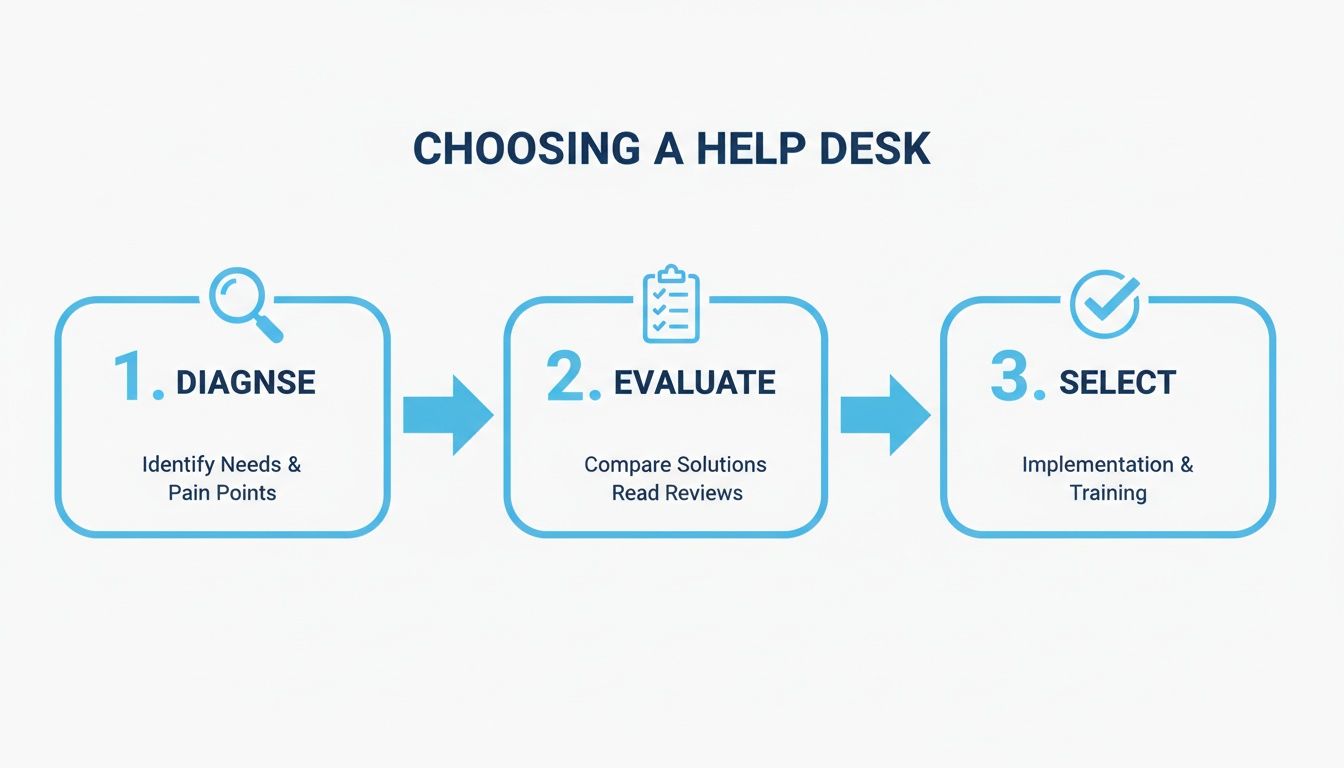
This journey starts with diagnosing your pain points, moves to evaluating your options, and ends with selecting the right tool for the job. Now, let’s tackle the implementation.
Phase 1: Getting Everything Connected
First things first, you need to plug everything in. This initial setup is the foundation for your entire support operation. The goal is to get data flowing seamlessly between your store and your new help desk, creating one single place to see everything about your customers.
- Link Your Shopify Store: This is non-negotiable. Most modern help desks offer a one-click install from the Shopify App Store. This syncs crucial information like customer details, order history, and tracking numbers right into your support inbox.
-
Connect Your Support Channels: You need to forward your main support email (like
support@yourstore.com) so that every customer message automatically becomes a ticket. Do the same for your live chat, social media DMs, and any other way customers contact you. - Import Old Conversations: If your new platform supports it, bring over your past customer conversations. This gives your agents valuable context on previous issues and helps any built-in AI learn your brand’s tone of voice much faster.
Phase 2: Building Your Automation Engine
With all your data in one place, it’s time to build the workflows that will save your team countless hours. This is where you set up the rules and automations that handle the easy, repetitive questions, letting your team focus on the customers who really need a human touch.
Don't try to boil the ocean. Start by automating your top 3-5 most frequent questions. Things like "Where is my order?" or basic return policy queries are perfect candidates. Nailing these first delivers an immediate win and builds momentum for more advanced automation later.
Setting up smart automation is a bit like bringing the benefits of help desk outsourcing in-house. It’s a massive trend for a reason; the global market hit nearly USD 10 billion in 2024, and a staggering 50% of organizations now outsource at least some of their IT support functions. For Shopify stores, a tool like MAILO AI lets you achieve that same efficiency without hiring an outside firm. You can read more about how outsourcing trends are shaping IT support at auxis.com.
Phase 3: Training the Team and Going Live
The final piece of the puzzle is your people. You could have the most powerful software in the world, but it’s useless if your team doesn't know how to use it.
- Run Hands-On Training: Get your team in the tool. Walk them through the entire ticket process, from opening a new query to using automation features and pulling up customer data from Shopify.
- Create Simple Rules of Engagement: Develop a few basic guidelines. How should agents tag tickets? When should they use internal notes for collaboration? What’s the process for escalating a tricky issue to a manager?
- Launch and Listen: Go live! But stay close. Monitor everything for the first few days, check in constantly with your team for feedback, and keep an eye on your key metrics to make sure the launch is a success.
For a deeper dive, we’ve put together a full library of tutorials and implementation guides to help you get started.
Measuring the KPIs That Truly Matter for E-Commerce Support
So, you've invested in a sophisticated help desk service. That's a great first step, but how do you actually know it's working? The proof is in the numbers—the ones that directly connect your support efforts to your bottom line. Forget gut feelings; we need to focus on key performance indicators (KPIs) that tell a clear story about your team's efficiency and your customers' happiness.
These metrics aren't just for managers to glance at in a report. They're the vital signs of your entire customer experience, showing you where you're knocking it out of the park and, more importantly, where things need a tune-up.
Traditional Support Metrics to Master
Before we get into the fancy stuff, you have to nail the basics. There are a few foundational KPIs every single e-commerce brand must track. These have been the standard for years for a simple reason: they give you a direct window into the speed and quality of your support.
Think of these three as the bedrock of your performance measurement:
- First Response Time (FRT): How long does a customer have to wait for that first reply? A low FRT is a massive win for satisfaction. In fact, studies show 66% of customers expect an immediate response when they reach out.
- Average Resolution Time (ART): This is the total time from the moment a ticket is opened until it's completely closed. The faster you can solve a problem, the less frustrated a customer becomes, which is crucial for preventing negative reviews.
- Customer Satisfaction (CSAT): This is the ultimate report card. It usually comes from a simple question: "How satisfied were you with your support experience?" A high CSAT score is one of the strongest predictors of customer loyalty and repeat business.
The real magic happens when you connect these metrics to business goals. For example, a 20% reduction in your resolution time isn't just an internal high-five for the support team; it can directly lead to a measurable lift in customer retention. Suddenly, your support team isn't a cost center—it's a growth engine.
The AI-Powered Metrics That Quantify ROI
While the classic KPIs are non-negotiable, today's help desk tools bring new metrics to the table, specifically designed to measure the impact of automation. These AI-centric KPIs help you calculate the direct return on your investment in new tech.
By focusing on automation-specific metrics, you can see exactly how much time and money your AI is saving the company. It shifts the conversation from "how busy are we?" to "how efficient are we?"
Here are the key AI metrics to watch:
- Automated Resolution Rate: What percentage of tickets are solved completely by AI, with zero human touch? A high number here means your automation is doing its job, deflecting all those common, repetitive questions.
- Agent Touches Per Ticket: How many times does a human agent have to interact with a single ticket before it's resolved? A lower number is better, showing that agents are solving issues more efficiently, often because AI is giving them the context or suggestions they need.
These numbers give you the hard data to constantly refine your support strategy. For a deeper dive into tracking these and other crucial metrics, you can learn more about how to measure customer service with our detailed guide. It’s this data-driven approach that turns a good support team into a great one.
Got Questions About Help Desk Services? We've Got Answers.
Jumping into the world of help desk services can feel a bit overwhelming, especially when you're busy running a Shopify store. Let's tackle some of the most common questions we hear from merchants just like you.
"My Store Is Still Small. Is It Too Early for a Help Desk?"
Definitely not. Think of it like pouring a solid foundation before you build a house. Getting a help desk set up early establishes good habits and scalable systems right from the start. That way, you're not left scrambling when your order volume explodes during a big sale or the holiday rush.
Even when you're small, automating just the top 10-20% of your most common questions frees up a surprising amount of your time. You can reinvest that time into marketing and product development—the things that actually grow your business. Plus, every customer gets a fast, professional reply, which is exactly how you build the loyalty needed to scale.
"Will Using an AI Help Desk Make My Brand Sound Like a Robot?"
That’s a totally fair question, and one the best AI tools are built to solve. Modern AI doesn't just spit out generic answers; it learns from your past conversations to mimic your unique brand voice. Whether you're fun and witty or formal and straight-to-the-point, you set the tone.
The real magic happens when you blend automation with a human touch. Many systems let your team quickly review and approve AI-generated replies before they go out. This gives you the best of both worlds: the speed of automation with the authenticity of your brand.
"How Much Technical Skill Do I Need to Set One Up?"
If you can manage your Shopify store, you've got this. Seriously. Solutions designed specifically for Shopify merchants are built for ease of use, not for developers.
The process is usually a simple one-click install from the Shopify App Store. From there, you just connect your support email and use a drag-and-drop or simple menu interface to get your first automations running. You can have a modern help desk up and running in less than an hour, no coding required.
"Can I Use a Help Desk for More Than Just Answering Tickets?"
Absolutely. A good help desk is a goldmine of customer insights. By tagging and analyzing conversations, you can easily spot trends you’d otherwise miss. Are people constantly confused about a specific product? Is a feature missing from your FAQ page? What are customers begging you to stock next?
This turns random customer feedback into hard data you can act on. Those insights can guide everything from your next product launch to the copy on your homepage, transforming your support inbox from a cost center into a growth engine.
Ready to see what an AI-powered help desk can do for your Shopify store's email support? MAILO AI gives customers instant, on-brand answers to their questions, letting your team focus on what matters most. Start your free trial at mailo.ai and discover your new competitive advantage.